Blog

  • What Is the Best AI Writing Environment in 2026: GPT-5.4 Canvas or Claude Opus 4.7 Artifacts? [AI Overview]


    Quick Answer: GPT-5.4 Canvas is the better general-purpose AI writing environment for outlining, drafting, rewriting, and fast editorial iteration. Claude Opus 4.7 Artifacts is stronger for coding-heavy writing, structured long-form reasoning, multi-tool orchestration, and vision-heavy workflows.

    In 2026, the best AI writing environment is less about raw model intelligence and more about workflow fit. ChatGPT with GPT-5.4 Canvas, Claude with Opus 4.7 Artifacts, Gemini, and GPT-5.5-style agentic systems each serve different writing, coding, research, and production needs.

    Which AI writing environment is best overall in 2026?

    GPT-5.4 Canvas is the best overall AI writing environment for most writers because it is flexible, fast, and well suited to drafting, editing, rewriting, and content planning. Claude Opus 4.7 Artifacts is the better choice when the writing project depends on complex reasoning, code generation, structured documents, or visual-context analysis.

    The answer is not a simple “Claude Opus 4.7 vs ChatGPT” winner. ChatGPT remains the more versatile mainstream writing workspace, while Claude often feels stronger when the document is technical, analytical, or tied to code and tools.

    Environment Best For Main Strength Main Limitation
    GPT-5.4 Canvas General writing, editing, brainstorming Fast drafting and broad workflow flexibility Not always the top coding benchmark leader
    Claude Opus 4.7 Artifacts Technical writing, coding, structured reasoning Strong coding, orchestration, and long-form coherence Can feel less universal for quick content production
    GPT-5.5 agentic workflows Autonomous research, agents, tool use Reportedly stronger agentic performance May be overkill for ordinary writing
    Gemini Google-native research and multimodal work Strong integration with search and media workflows Writing experience depends heavily on ecosystem fit

    How do GPT-5.4 Canvas and Claude Opus 4.7 Artifacts compare on benchmarks?

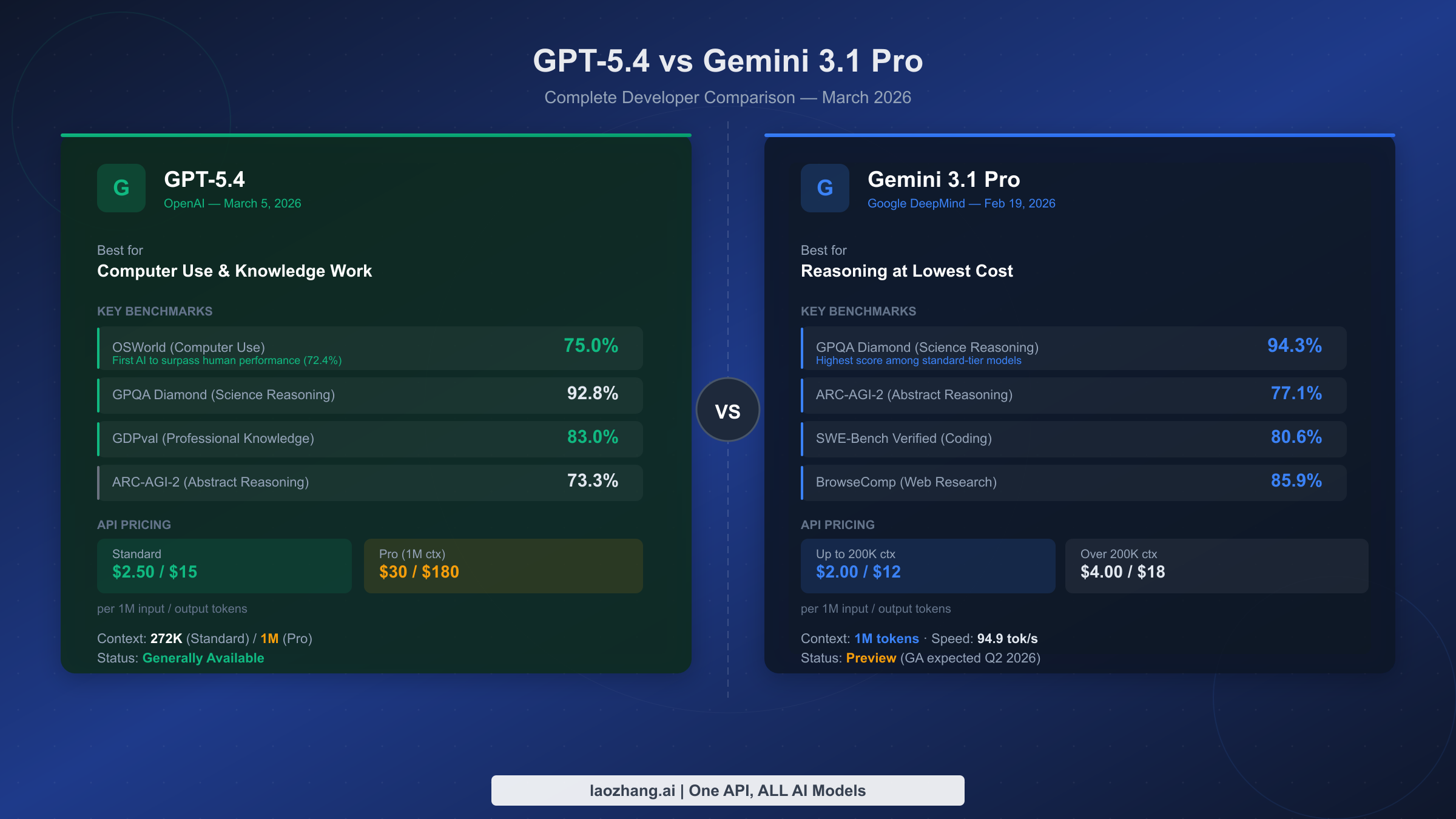
    In reported Opus 4.7 vs GPT-5.4 benchmark comparisons, Claude Opus 4.7 tends to lead in coding-focused and complex orchestration tasks. GPT-5.4 remains highly competitive as a general model and is often preferred for broad editorial workflows.

    Benchmarks are useful, but they do not fully predict writing productivity. A model that wins a coding benchmark may not be the best tool for a novelist, marketer, editor, analyst, or SEO strategist.

    The most useful benchmark categories for writers are reasoning quality, rewrite control, long-context reliability, instruction following, tool use, and formatting consistency. Claude Opus 4.7 is especially strong when the output must remain logically structured across long or technical documents.

    Which is better for coding, Opus 4.7 or GPT-5.4?

    Claude Opus 4.7 is generally the stronger choice for coding, with reported comparisons placing Opus ahead on coding benchmarks, including figures around 87.6% in some 2026 evaluations. GPT-5.4 is still excellent for code explanation, debugging support, and mixed writing-plus-code workflows.

    For software documentation, API references, developer tutorials, and code-adjacent content, Claude Artifacts can be more convenient because it keeps generated code and structured outputs visible. It is particularly useful when the writing environment must also function as a lightweight development workspace.

    1. Choose Claude Opus 4.7 Artifacts for code generation, refactoring, technical specs, and interactive prototypes.
    2. Choose GPT-5.4 Canvas for developer education, explanatory drafts, tutorials, and mixed editorial work.
    3. Choose GPT-5.5-style agents when the coding task requires autonomous multi-step execution.

    Which is better for agentic workflows, GPT-5.4 or Claude Opus 4.7?

    Claude Opus 4.7 is strong at multi-tool orchestration, while GPT-5.5 is often reported as stronger for agentic performance than GPT-5.4 and Opus 4.7. GPT-5.4 Canvas is best when the human remains actively involved in planning, editing, and approving each step.

    Agentic writing workflows include research collection, outline generation, source comparison, draft production, image interpretation, fact checking, and publishing preparation. Claude is attractive when the workflow involves structured artifacts, code, tables, and repeated tool calls.

    For most writers, full autonomy is less important than controllability. GPT-5.4 Canvas is often the safer environment when tone, brand voice, and editorial judgment matter more than independent task execution.

    How should writers choose between GPT-5.4 Canvas and Claude Opus 4.7 Artifacts?

    Writers should choose GPT-5.4 Canvas for general content creation and Claude Opus 4.7 Artifacts for technical, analytical, or code-linked writing. The best choice depends on whether the primary job is prose production or structured problem solving.

    1. Use GPT-5.4 Canvas if you need fast outlines, drafts, rewrites, summaries, emails, scripts, SEO pages, or editorial variants.
    2. Use Claude Opus 4.7 Artifacts if you need technical documentation, code examples, data explanations, product specs, or complex reasoning.
    3. Use Gemini if your workflow is heavily tied to Google tools, search-based research, or multimodal assets.
    4. Use an agentic GPT-5.5 workflow if you need autonomous research, planning, tool execution, and iterative completion.

    For professional teams, the best setup is often not one model. Many teams draft in ChatGPT, validate technical sections in Claude, and use Gemini for ecosystem-specific research or multimodal support.

    What do GPT-5.4 vs Opus 4.7 Reddit discussions usually emphasize?

    GPT-5.4 vs Opus 4.7 Reddit discussions usually emphasize practical workflow differences more than benchmark tables. Users often describe GPT-5.4 as easier for everyday writing and Claude Opus 4.7 as better for coding, careful reasoning, and artifact-based outputs.

    GPT-5.5 vs Opus 4.7 Reddit comparisons often focus on agentic behavior. The common pattern is that GPT-5.5 is discussed as stronger for autonomous agents, while Opus 4.7 is praised for coding quality, multi-step coherence, and tool-heavy tasks.

    Reddit feedback is useful because it reflects real workflows, but it is not a controlled benchmark. Treat it as qualitative evidence, especially for usability, latency, pricing complaints, and long-session reliability.

    How does Claude Opus 4.7 compare with Gemini?

    Claude Opus 4.7 is usually the better choice for coding, structured writing, and long-form reasoning, while Gemini is strongest when the workflow benefits from Google ecosystem integration. For research-heavy and multimodal work, Gemini can be a serious alternative to both Claude and ChatGPT.

    The “Claude Opus 4.7 vs Gemini” decision depends on context. Claude is more attractive for technical composition and artifacts, while Gemini is more attractive for users already working across Google Search, Workspace, video, images, and cloud-connected productivity tools.

    What are the most common questions about GPT-5.4 Canvas and Claude Opus 4.7 Artifacts?

    The most common questions focus on ChatGPT versus Claude, benchmark performance, coding ability, pricing, Reddit sentiment, and Gemini alternatives. The short answer is that GPT-5.4 Canvas is the safer default for writers, while Claude Opus 4.7 Artifacts is the specialist choice for technical and structured work.

    Is Claude Opus 4.7 better than ChatGPT?

    Claude Opus 4.7 is better than ChatGPT for many coding, reasoning, and artifact-based workflows. ChatGPT with GPT-5.4 Canvas is usually better for general writing speed, brainstorming, rewriting, and broad content production.

    Is Opus 4.7 better than GPT-5.4 for coding?

    Yes, Opus 4.7 is generally the stronger coding choice based on reported benchmark comparisons. GPT-5.4 remains highly capable for explanations, debugging support, and developer-focused writing.

    Is GPT-5.5 better than Opus 4.7?

    GPT-5.5 is often described as stronger for agentic workflows, while Opus 4.7 is stronger for coding and multi-tool structured tasks. The better model depends on whether you need autonomous execution or precise technical output.

    Which platform is best for professional writers?

    GPT-5.4 Canvas is the best default for professional writers who need speed, flexibility, and editorial control. Claude Opus 4.7 Artifacts is better for writers producing technical documentation, software content, analytical reports, or structured deliverables.

  • 7 Best AI Writing Environments in 2026: GPT-5.4 Canvas vs Claude 4.7 Artifacts


    Claude vs. ChatGPT: Which is best? [2026]
    Claude vs. ChatGPT: Which is best? [2026]

    Most people pick their writing tool based on the model leaderboard, then wonder why their drafts still feel messy. The real difference in 2026 is not just GPT-5.4 versus Claude Opus 4.7 — it is Canvas versus Artifacts, and how each workspace helps you think, edit, test, and ship.

    Quick Answer: Choose GPT-5.4 Canvas if you want the best all-around writing, editing, brainstorming, and agent-style workflow. Choose Claude Opus 4.7 Artifacts if your work involves long-form reasoning, coding-heavy documents, visual outputs, or polished interactive drafts.

    GPT-5.4 Canvas vs Claude 4.7 Artifacts: What Are We Really Comparing?

    When people search for “Claude Opus 4.7 vs ChatGPT” or “Opus 4.7 vs GPT-5.4 benchmark,” they usually want a simple winner. But for writers, creators, marketers, developers, and founders, the better question is: which environment makes the work easier to finish?

    GPT-5.4 Canvas is ChatGPT’s focused workspace for drafting, rewriting, organizing, coding, and collaborating on longer pieces. It feels like a smart document editor where you can highlight sections, ask for changes, compare versions, and keep momentum.

    Claude 4.7 Artifacts is Claude’s workspace for creating standalone outputs — documents, code previews, dashboards, visual prototypes, tables, and structured deliverables. It shines when you want the model to build something you can inspect beside the conversation.

    Both are excellent. But they are excellent in different ways.

    Best AI Models 2026: GPT-5.4 Vs Claude 4.7 Vs Gemini 2.5 Pro | Appscribed
    Best AI Models 2026: GPT-5.4 Vs Claude 4.7 Vs Gemini 2.5 Pro | Appscribed

    The Fast Comparison Table

    Category GPT-5.4 Canvas Claude Opus 4.7 Artifacts Best Pick
    General writing Fast, flexible, strong at tone changes and iterative editing More deliberate, polished, and often more nuanced GPT-5.4 Canvas for speed
    Long-form content Great for outlines, revisions, and multi-step drafting Excellent at structure, coherence, and sustained reasoning Claude 4.7 Artifacts
    Coding Strong, especially with agentic debugging and app workflows Reported coding benchmark leadership around 87.6% in some evals Claude 4.7 Artifacts
    Agentic tasks Better for tool use, workflow execution, and multi-step automation Very capable, especially for multi-tool orchestration GPT-5.4 Canvas
    Visual/interactive outputs Useful, but more editor-first Artifacts are excellent for previews and working deliverables Claude 4.7 Artifacts
    Best for teams Marketing, operations, product, and mixed workflows Engineering, research, product specs, and technical writing Depends on team type

    1. Best Overall Writing Environment: GPT-5.4 Canvas

    If your day includes blog posts, emails, landing pages, scripts, outlines, rewrites, briefs, and client work, GPT-5.4 Canvas is the easier default recommendation [AMAZON_LINK].

    The main advantage is flow. You can start with a rough idea, turn it into an outline, expand it into a draft, highlight a weak section, rewrite the intro, shorten the ending, and ask for a stronger headline without constantly losing context.

    Canvas is especially good when you need to:

    • Create several versions of the same message
    • Rewrite in different tones or reading levels
    • Turn research notes into structured drafts
    • Improve hooks, headlines, CTAs, and transitions
    • Move quickly from idea to publishable copy

    For most writers and marketers, the winner is not the model that scores highest on a coding benchmark. It is the one that helps you get from blank page to final draft with the least friction. That is where Canvas feels strongest.

    Claude Opus 4.7 vs GPT-5.4 on a simple prompt - “build a Flappy Bird  clone.” Both models delivered
    Claude Opus 4.7 vs GPT-5.4 on a simple prompt – “build a Flappy Bird clone.” Both models delivered

    2. Best for Polished Long-Form Work: Claude Opus 4.7 Artifacts

    Claude Opus 4.7 Artifacts is the better choice when you care about depth, structure, and careful reasoning [AMAZON_LINK]. If GPT-5.4 Canvas feels like a fast creative partner, Claude Artifacts feels like a patient senior editor who also knows how to build a working prototype.

    For long-form articles, white papers, reports, product documentation, and strategy memos, Claude often produces a more naturally organized first draft. It tends to keep track of subtle instructions well, especially when the assignment has constraints.

    Artifacts also make the output feel tangible. Instead of burying everything in a chat thread, Claude can place a document, code file, table, or prototype in a separate workspace. That is extremely useful when reviewing:

    • Technical documentation
    • Research summaries
    • Product requirement documents
    • Interactive content mockups
    • Code-based examples and demos

    3. Coding: Claude 4.7 Has the Edge, But It Depends on the Job

    For “Opus 4.7 vs GPT-5.4 coding,” the short answer is: Claude Opus 4.7 usually has the edge for complex coding reasoning. Recent comparisons often cite Opus leading coding-focused evaluations, with figures around 87.6% in some benchmark discussions.

    That said, GPT-5.4 is not weak. In fact, for practical app-building workflows, bug fixing, and multi-step tool use, GPT-5.4 can feel faster and more action-oriented. If your coding work involves asking the model to plan, edit, test, explain, and keep moving across a project, GPT-5.4 Canvas remains highly competitive.

    Use Claude 4.7 Artifacts for coding when:

    • You want clean, well-reasoned code explanations
    • You are building demos, previews, or interactive examples
    • You need careful refactoring
    • You are working through complex logic or architecture

    Use GPT-5.4 Canvas for coding when:

    • You want faster iteration
    • You are combining code with docs, copy, and planning
    • You need agent-style execution
    • You prefer a flexible editor-style workspace
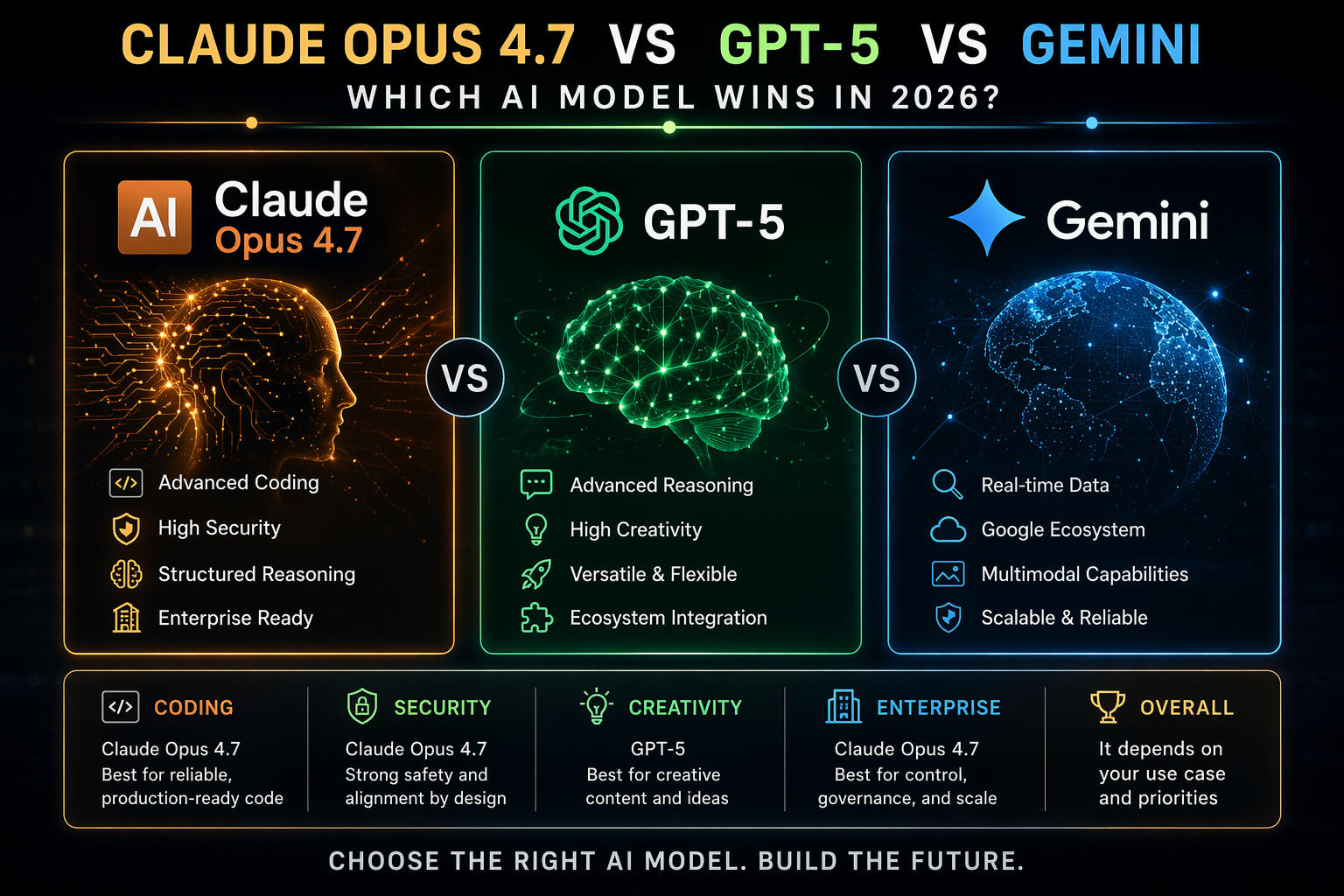
    Claude Opus 4.7 vs GPT-5 vs Gemini: Ultimate AI Comparison
    Claude Opus 4.7 vs GPT-5 vs Gemini: Ultimate AI Comparison

    4. Agentic Performance: GPT-5.4 Feels More Practical for Everyday Workflows

    Benchmarks are helpful, but real workflows are messier. You might ask your tool to research competitors, draft a comparison page, create a launch checklist, write email copy, produce a social calendar, and turn everything into a clean internal brief.

    That is where GPT-5.4 Canvas often feels more natural. It is strong at multi-step execution, fast revisions, and practical task completion. In broader model discussions, newer GPT-5.5 comparisons often show stronger agentic performance, but GPT-5.4 already performs very well for everyday business workflows.

    Claude 4.7 is also excellent at orchestration, especially when the work requires careful reasoning across tools or inputs. But if you want a general assistant that helps you move through a messy to-do list, GPT-5.4 Canvas is usually the safer pick.

    5. Vision-Heavy and Interactive Workflows: Claude Artifacts Wins

    If your work includes screenshots, diagrams, UI reviews, data visuals, prototypes, or interactive outputs, Claude Artifacts has a real advantage. The Artifact workspace makes it easier to inspect what was created, refine it, and treat it like a deliverable instead of a message.

    This is why product teams, developers, educators, and technical creators often prefer Claude for visual and interactive work. You can ask for a prototype, review the result, request changes, and keep the working object separate from the conversation.

    The AI model showdown. With so many choices, why settle on one? Different  models for different uses
    The AI model showdown. With so many choices, why settle on one? Different models for different uses

    6. Pricing: Don’t Pick Only by Subscription Cost

    Pricing changes often, and both platforms continue to adjust limits, plans, and team features. The smarter move is to evaluate cost by finished output per hour, not just monthly subscription price.

    Ask yourself:

    • Which tool gets me to a final draft faster?
    • Which one requires fewer rewrites?
    • Which one handles my longest documents better?
    • Which one reduces manual formatting or debugging?
    • Which one fits my team’s review process?

    If GPT-5.4 saves you three hours a week on marketing work, it is probably worth it. If Claude 4.7 prevents one major coding mistake or produces better technical docs, it may pay for itself immediately.

    7. Best Alternatives: Gemini, GPT-5.5, and Reddit’s Favorite Debates

    People also ask about Claude Opus 4.7 vs Gemini. Gemini remains a strong option, especially if your workflow is deeply tied to Google’s ecosystem. For research, files, spreadsheets, and productivity integration, it can be very convenient. But for pure writing environment quality, Canvas and Artifacts still feel more focused.

    As for “GPT-5.5 vs Opus 4.7 Reddit” and “GPT-5.4 vs Opus 4.7 Reddit,” the pattern is predictable: developers often praise Claude’s coding quality, while marketers, operators, and general users often prefer ChatGPT’s speed and flexibility. Both sides are right because they are solving different problems.

    How to Choose in 60 Seconds

    1. If you write daily marketing content: choose GPT-5.4 Canvas [AMAZON_LINK].
    2. If you create technical docs or code-heavy content: choose Claude Opus 4.7 Artifacts [AMAZON_LINK].
    3. If you need visual prototypes or interactive files: choose Claude.
    4. If you need a flexible all-purpose work assistant: choose GPT-5.4.
    5. If your team is mixed: use both, with GPT-5.4 for drafting and Claude for technical review.

    FAQ

    Is Claude Opus 4.7 better than ChatGPT?

    Claude Opus 4.7 is often better for coding, long-form reasoning, technical writing, and Artifact-based outputs. ChatGPT with GPT-5.4 Canvas is usually better for fast drafting, everyday writing, brainstorming, and agent-style workflows.

    Which is better for benchmarks: Opus 4.7 or GPT-5.4?

    Opus 4.7 tends to lead in several coding and reasoning-heavy comparisons, including reported coding scores around 87.6%. GPT-5.4 remains extremely competitive overall and often feels stronger in practical workflow execution.

    Is GPT-5.4 Canvas good for coding?

    Yes. GPT-5.4 Canvas is strong for coding, especially when the task includes planning, debugging, documentation, and iterative improvement. Claude 4.7 may be better for complex code reasoning, but GPT-5.4 is excellent for practical development workflows.

    Should I use Claude Artifacts for writing?

    Yes, especially for long-form documents, structured reports, technical guides, and content that benefits from a separate preview area. Artifacts make it easier to review and refine polished outputs.

    What about Claude Opus 4.7 vs Gemini?

    Gemini is a good option for users heavily invested in Google tools. But if your main priority is a premium writing and creation environment, GPT-5.4 Canvas and Claude 4.7 Artifacts are usually stronger choices.

    Final Recommendation

    If you want one tool for most writing, editing, planning, and day-to-day business work, pick GPT-5.4 Canvas [AMAZON_LINK]. It is faster, more flexible, and easier to use across mixed workflows.

    If your work is technical, code-heavy, visual, or deeply structured, pick Claude Opus 4.7 Artifacts [AMAZON_LINK]. It is the stronger choice for careful reasoning, coding quality, and interactive deliverables.

    The best setup for serious work in 2026 is simple: use GPT-5.4 Canvas to move fast, and Claude 4.7 Artifacts to refine, validate, and build the parts that need extra precision.

  • Which Is Better for Customer Service: Ready-Made AI Agents or Custom GPT-5.5 Solutions? [AI Overview]


    Quick Answer: Ready-made AI agent platforms are best when you need fast deployment, standard support automation, and lower implementation risk. Custom GPT-5.5 solutions are better when customer service depends on proprietary workflows, complex integrations, regulated data handling, or differentiated service experiences.

    AI agents in customer service are no longer just chatbots that answer FAQs. They can triage tickets, update CRM records, process refunds, summarize calls, trigger workflows, and escalate cases with context.

    The key decision is whether to buy a ready-made AI agent platform or build a custom GPT-5.5-based solution. The right answer depends on task complexity, integration depth, compliance needs, and how much competitive advantage your support operation creates.

    What is the difference between AI agents and custom GPT-5.5 solutions?

    AI agents are designed to take action and execute tasks across systems, while custom GPT-5.5 solutions can be built as either reference assistants or fully agentic systems. A custom GPT is often a specialized knowledge tool people consult for answers, whereas an AI agent is a dynamic system people delegate work to.

    In customer service, that distinction matters. A GPT-style assistant may draft a response, but an agent can check order status, apply policy rules, issue a replacement, and close the ticket.

    GPT-5.5 for business-style implementations are typically used for advanced automation, coding support, data workflows, and multi-step reasoning. In service teams, those capabilities are most valuable when the AI must interpret messy customer intent and act safely inside business systems.

    When should a company choose a ready-made AI agent platform?

    A company should choose a ready-made AI agent platform when it needs fast results for common support tasks. These tools are strongest when workflows are predictable, integrations are already supported, and the team prefers configuration over engineering.

    Ready-to-go platforms usually include connectors for helpdesks, CRMs, ecommerce platforms, knowledge bases, and messaging channels. They may also include analytics, human handoff, conversation testing, and admin controls out of the box.

    This makes them attractive for teams that want to automate repetitive requests such as password resets, delivery updates, booking changes, subscription questions, returns, and basic troubleshooting. The trade-off is that customization may be limited by the vendor’s workflow model.

    When should a business build a custom GPT-5.5 customer service solution?

    A business should build a custom GPT-5.5 solution when support is complex, high-value, regulated, or deeply tied to internal systems. Custom development is also stronger when customer experience itself is a strategic differentiator.

    Custom GPT-5.5 systems can be designed around proprietary policies, unusual escalation paths, internal databases, product telemetry, billing logic, and compliance requirements. They can also be tuned for brand voice, risk tolerance, and domain-specific reasoning.

    The main downside is that custom systems require more planning, testing, governance, and maintenance. They also need strong observability, because an agent that takes actions must be monitored more carefully than a tool that only provides suggestions.

    Which customer service AI option fits each use case?

    The best option depends on whether the AI needs to answer, assist, or act. Simple knowledge automation favors ready-made tools, while complex cross-system execution favors custom GPT-5.5 agents.

    Option Best for Strength Limitation
    Ready-made AI agent platform Standard ticket automation and chat support Fast deployment with built-in integrations Less flexible for unique workflows
    Helpdesk-native AI assistant Teams already using a major support suite Easy adoption and familiar admin controls Often optimized for that vendor’s ecosystem
    Custom GPT-5.5 support copilot Agent assistance, summaries, drafts, and guidance Improves human productivity without full autonomy Still depends on staff to take final action
    Custom GPT-5.5 autonomous agent Complex workflows across CRM, billing, logistics, and product systems High flexibility and differentiated automation Requires engineering, governance, and testing

    How should leaders evaluate ready-made tools versus custom GPT-5.5 agents?

    Leaders should evaluate options by business outcome, not by model novelty. The right question is which approach reduces resolution time, improves accuracy, protects customers, and scales without creating operational risk.

    1. Map the work: Identify the top ticket types, required systems, decision rules, and failure points.
    2. Classify autonomy: Decide whether the AI should answer, recommend, draft, execute, or fully resolve.
    3. Check integration needs: List every system the agent must read from or write to.
    4. Assess risk: Separate low-risk tasks from refunds, account changes, compliance issues, and sensitive cases.
    5. Estimate maintenance: Include policy updates, prompt changes, testing, audit logs, and human review.

    A practical evaluation should include real tickets, not only demo scenarios. Many platforms look strong in scripted examples but struggle with edge cases, incomplete customer messages, and conflicting policy data.

    What are the main advantages of ready-made AI customer service agents?

    Ready-made agents are faster to launch, easier to manage, and usually cheaper at the beginning. They are especially useful for teams that need automation now and do not have dedicated AI engineering capacity.

    Their biggest advantage is operational maturity. Vendors often provide deployment templates, fallback logic, reporting dashboards, multilingual support, and integrations that would take months to build internally.

    They are also easier for non-technical support managers to control. This matters because customer service automation changes frequently as policies, promotions, products, and customer expectations evolve.

    What are the main advantages of custom GPT-5.5 customer service agents?

    Custom GPT-5.5 agents provide deeper flexibility, stronger differentiation, and better alignment with complex internal operations. They are the better choice when the AI must reason over proprietary data and take precise actions across multiple systems.

    A custom system can combine retrieval, business rules, API calls, workflow orchestration, human approval, and audit trails. It can also use different levels of autonomy for different customer segments or issue types.

    For example, a custom agent might automatically resolve a standard delivery delay but require human approval before issuing a large enterprise credit. That kind of policy-specific control is where custom architecture becomes valuable.

    How can companies reduce risk when deploying AI agents in support?

    Companies reduce risk by limiting autonomy at first, testing against real cases, and requiring human approval for sensitive actions. AI agents should be treated as operational systems, not just conversation interfaces.

    1. Start with low-risk workflows: Automate information retrieval, summaries, routing, and simple status updates first.
    2. Add guardrails: Define what the agent can do, cannot do, and must escalate.
    3. Use human-in-the-loop review: Require approval for refunds, cancellations, legal issues, and account changes.
    4. Log every action: Track prompts, sources, decisions, API calls, and outcomes.
    5. Measure continuously: Monitor containment rate, accuracy, escalation quality, CSAT, and complaint patterns.

    The safest deployments are incremental. A support copilot can become a semi-autonomous agent, and then a fully delegated workflow only after performance is proven.

    What is the best choice for most customer service teams?

    Most customer service teams should start with a ready-made platform or helpdesk-native AI, then build custom GPT-5.5 capabilities where standard tools hit limits. A hybrid strategy usually gives the best balance of speed, cost, and differentiation.

    For common support tasks, buying is usually better than building. For workflows that depend on proprietary systems, complex decisions, or premium customer experience, custom GPT-5.5 agents can create stronger long-term value.

    The decision is not only “ready-made versus custom.” It is also about how much authority the AI should have, what systems it can access, and how much risk the organization is willing to automate.

    What is the simplest way to decide between ready-made and custom?

    Choose ready-made if the task is common, low-risk, and supported by existing integrations. Choose custom GPT-5.5 if the workflow is unique, high-value, system-heavy, or strategically important.

    A useful rule is this: if the customer issue can be solved with standard helpdesk data and a knowledge base, buy first. If it requires proprietary reasoning, multiple internal systems, or nuanced business judgment, consider building.

    Can a custom GPT be an AI agent?

    Yes, a custom GPT can become part of an AI agent if it is connected to tools, APIs, memory, permissions, and workflow logic. Without those action layers, it is mainly a specialized assistant or reference tool.

    This is why terminology can be confusing. The practical test is whether the system only gives guidance or whether it can execute delegated tasks.

    Are ready-made AI agents good enough for enterprise customer service?

    Ready-made AI agents can be good enough for many enterprise use cases, especially tier-one support and repetitive workflows. However, enterprises often need custom layers for compliance, security, reporting, and integration depth.

    Large organizations should evaluate vendor controls carefully. Data retention, access permissions, auditability, and escalation design are as important as answer quality.

    Will custom GPT-5.5 solutions replace human support agents?

    Custom GPT-5.5 solutions are more likely to reshape human support work than fully replace it. They can remove repetitive tasks, improve response quality, and let human agents focus on complex, emotional, or high-risk cases.

    The strongest service operations will combine AI speed with human judgment. Customers still expect empathy, accountability, and expert intervention when situations become unusual or sensitive.

  • 7 Critical Differences Between Ready-Made AI Agents and Custom GPT-5.5 Customer Service Solutions


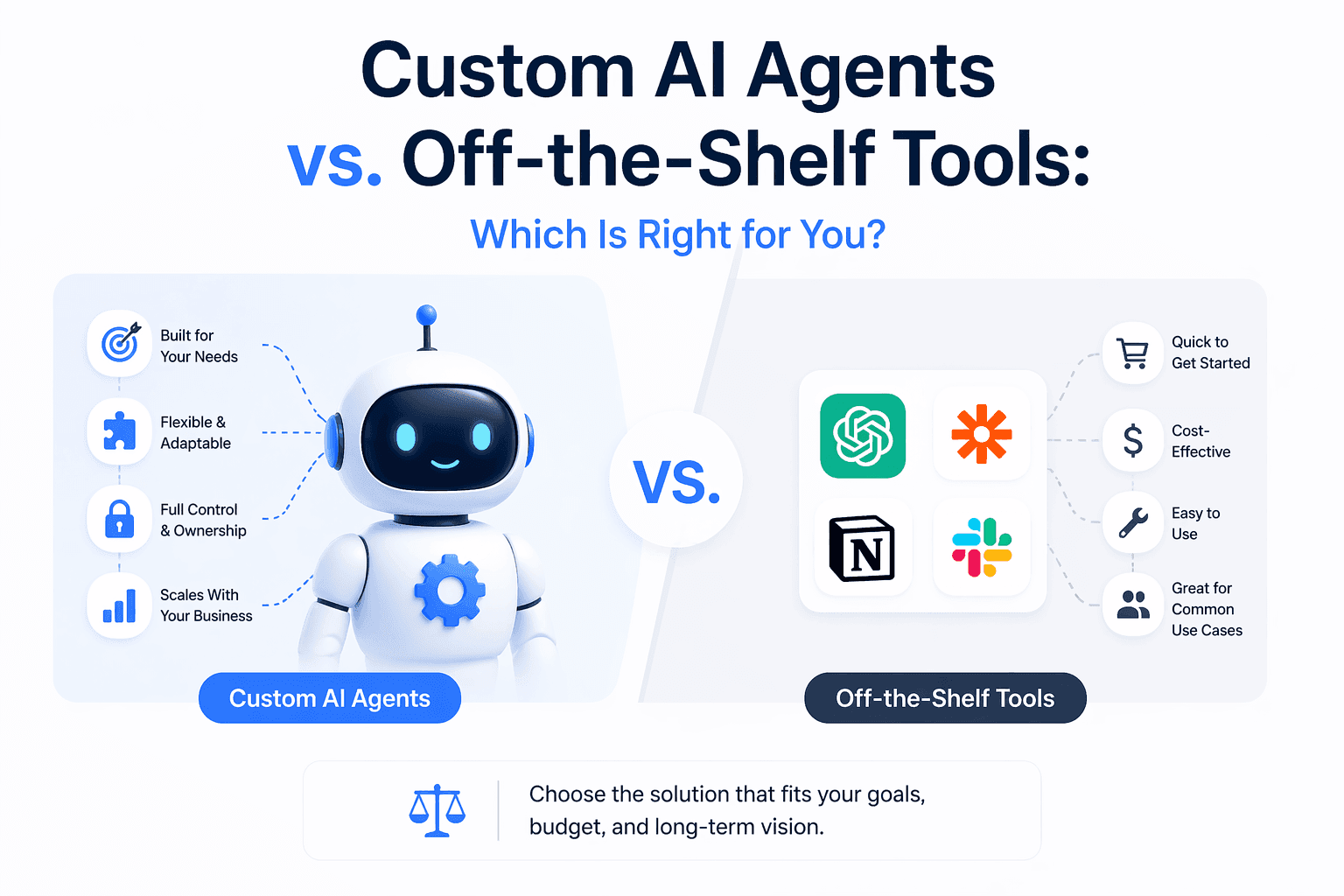
    Custom AI Agents vs. Off-the-Shelf Tools: Which Is Right for You?
    Custom AI Agents vs. Off-the-Shelf Tools: Which Is Right for You?

    Customer service teams are under pressure to do something fast with automation, but the wrong choice can quietly create more tickets, more escalations, and more frustrated customers. The real question is not “Should we use agents?” It is whether you should buy a ready-made customer service agent or build a custom GPT-5.5-powered solution around your business workflows.

    Quick Answer: Choose a ready-made AI agent if you need fast deployment, standard support workflows, and lower upfront complexity. Choose a custom GPT-5.5 solution if your service operation depends on proprietary data, complex decisions, deep system actions, or differentiated customer experience.

    What Is the Real Difference?

    A lot of teams use “custom GPT” and “AI agent” like they mean the same thing. They do not.

    A custom GPT is usually a specialized assistant designed to answer questions, interpret information, follow structured instructions, and guide users. It is often best as a reference tool: “What should I do?” or “How do I handle this policy?”

    An AI agent goes further. It can take action across systems: update an order, issue a refund, create a ticket, trigger a workflow, check a CRM record, or escalate a case based on business rules. In simple terms: people consult a custom GPT, but they delegate work to an AI agent.

    When you add GPT-5.5-level capabilities into the mix, custom solutions can become much more powerful: better reasoning, stronger coding and data workflow support, more sophisticated automation, and improved handling of messy customer interactions. But more power also means more design responsibility.

    Should you use ChatGPT or an AI agent for tasks?
    Should you use ChatGPT or an AI agent for tasks?

    Ready-Made AI Agents: Best When You Need Speed

    Ready-made customer service agents are prebuilt platforms designed for common support use cases. They usually plug into help desks, chat widgets, knowledge bases, CRMs, and customer messaging tools.

    Where ready-made agents shine

    • Fast launch: You can often pilot in days or weeks, not months.
    • Lower technical burden: Your team does not need to architect every workflow from scratch.
    • Prebuilt integrations: Many platforms already connect to popular support systems.
    • Built-in analytics: Deflection rate, resolution rate, CSAT impact, and escalation tracking are usually included.
    • Good for repetitive tickets: Password resets, order status, shipping questions, cancellations, returns, and basic troubleshooting.

    If your customer service operation mostly follows standard flows, a ready-made platform can be the practical choice. You get value quickly, avoid heavy engineering overhead, and reduce the risk of overbuilding.

    Where ready-made agents struggle

    The weakness is flexibility. A ready-made agent may handle “Where is my order?” beautifully, but struggle with nuanced situations like:

    • Multi-step refund logic based on customer history
    • Industry-specific compliance rules
    • Internal tools with no standard integration
    • Complex account permissions
    • High-value customer exceptions
    • Support experiences that need to match a unique brand voice

    This is where teams start to feel the ceiling. The tool works, but only inside the box it came in.

    Custom GPT-5.5 Solutions: Best When Service Is Strategic

    A custom GPT-5.5 solution is built around your data, rules, systems, and service model. Instead of adapting your process to a platform, you design the system around how your business actually works.

    This can include a customer-facing agent, an internal support copilot, automated triage, ticket summarization, CRM updates, quality assurance reviews, sentiment detection, knowledge base generation, and workflow execution.

    Where custom GPT-5.5 solutions win

    • Deeper workflow control: You decide exactly when the system answers, acts, escalates, or asks for approval.
    • Better use of proprietary data: Policies, contracts, customer records, product data, and internal documentation can be structured around your needs.
    • More complex reasoning: GPT-5.5-style systems can support advanced decision paths, coding tasks, and data workflows.
    • Unique customer experience: Tone, escalation logic, personalization, and brand standards can be tightly controlled.
    • Competitive advantage: Your support automation becomes part of your operating model, not just another vendor feature.

    The biggest advantage is that a custom solution can become more than a chatbot. It can become an operational layer that connects customer conversations to real business actions.

    The catch: custom means responsibility

    Custom does not automatically mean better. It means you own more of the decisions.

    You need to think about:

    • Data security and access permissions
    • Human approval steps for sensitive actions
    • Testing edge cases before launch
    • Monitoring hallucinations or incorrect actions
    • Fallback paths when systems fail
    • Ongoing maintenance as policies change

    If you do not have technical resources, strong process owners, or a clear support strategy, a custom build can become expensive and slow.

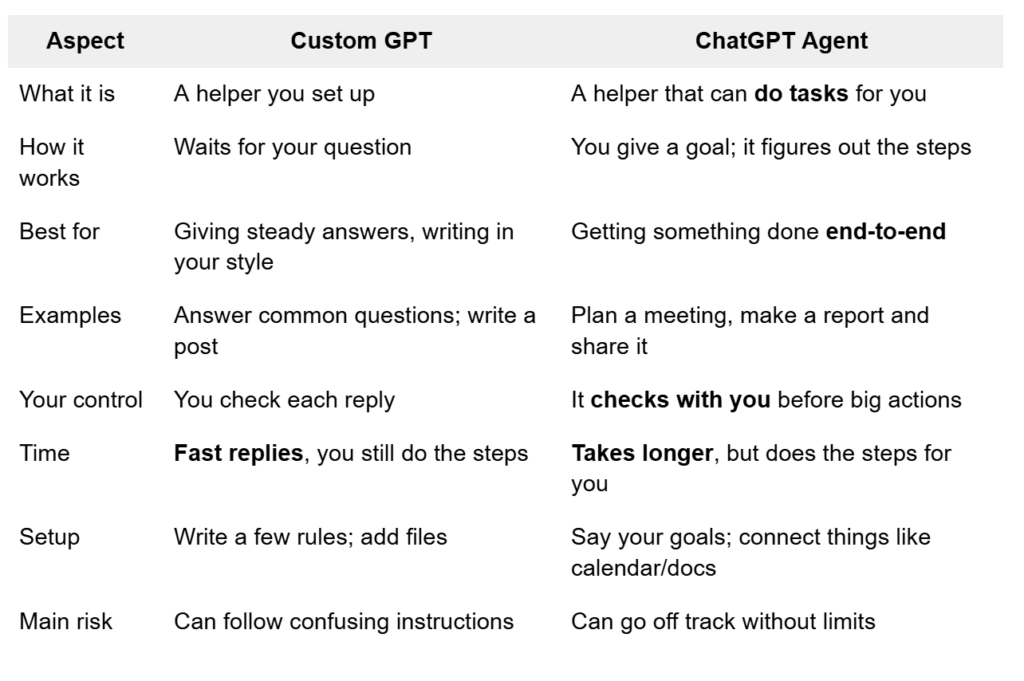
    Custom GPTs vs ChatGPT Agents: A Decision Guide - First Line Software
    Custom GPTs vs ChatGPT Agents: A Decision Guide – First Line Software

    Ready-Made vs Custom GPT-5.5: Side-by-Side Comparison

    Factor Ready-Made AI Agent Custom GPT-5.5 Solution
    Speed to launch Fast, often days or weeks Slower, often weeks or months
    Cost structure Lower upfront, recurring platform fees Higher upfront, flexible long-term economics
    Customization Limited to platform capabilities Highly tailored to workflows and systems
    Best for Common support tasks and standard workflows Complex, regulated, or differentiated service models
    Integrations Prebuilt connectors Custom APIs and deeper system orchestration
    Control Moderate High
    Risk Vendor lock-in and feature limitations Build complexity and maintenance burden

    How to Choose the Right Approach

    Here is the simplest way to decide.

    Choose a ready-made AI agent if:

    • You need results quickly
    • Your tickets are repetitive and predictable
    • Your support stack is already supported by major platforms
    • You do not have engineering resources available
    • You are testing automation for the first time
    • Your main goal is reducing ticket volume

    For many teams, this is the smartest starting point. You can learn what customers ask, measure automation impact, and identify which workflows deserve deeper investment later.

    Choose a custom GPT-5.5 solution if:

    • Your workflows are too specific for off-the-shelf tools
    • You need the agent to take actions across multiple internal systems
    • You operate in a regulated or high-risk environment
    • Your service experience is a major brand differentiator
    • You want to automate internal support operations, not just customer chat
    • You have proprietary data that creates a real advantage

    If support is central to retention, revenue, or compliance, custom is often worth the extra effort.

    Prompting vs custom GPTs vs AI agents This is where people kept getting  tripped up, in my AI Agent
    Prompting vs custom GPTs vs AI agents This is where people kept getting tripped up, in my AI Agent

    The Hybrid Approach Is Often the Smartest

    You do not have to pick only one. Many strong customer service teams use a hybrid model:

    1. Start with a ready-made agent for common front-line questions.
    2. Add a custom internal GPT to help agents find policies, draft replies, and summarize tickets.
    3. Build custom GPT-5.5 workflows for high-value or complex processes.
    4. Connect systems gradually instead of automating everything at once.
    5. Use human approvals before allowing sensitive actions like refunds, cancellations, or account changes.

    This approach gives you speed without giving up long-term control. It also reduces risk because you can prove value before investing in deeper automation.

    The Biggest Mistake Teams Make

    The biggest mistake is buying or building before mapping the work.

    Before choosing any solution, document your top 20 support workflows. For each one, ask:

    • Can this be answered from existing knowledge?
    • Does it require customer-specific data?
    • Does it require action in another system?
    • What is the risk if the wrong action happens?
    • Should the agent act automatically or ask for human approval?

    This exercise makes the decision much clearer. If most workflows are simple Q&A, ready-made is probably enough. If many workflows require judgment, data lookup, and system action, you are looking at a custom agent architecture.

    Custom GPT vs AI Agent
    Custom GPT vs AI Agent

    FAQ

    1. Is a custom GPT the same as an AI agent?

    No. A custom GPT usually provides answers, guidance, or structured information. An AI agent can go further by taking actions across systems, such as updating records, creating tickets, or triggering workflows.

    2. Are ready-made AI agents good enough for customer service?

    Yes, for many teams. They are especially useful for repetitive questions, simple account support, order tracking, returns, and standard troubleshooting. They may not be enough for complex or highly customized operations.

    3. When does a custom GPT-5.5 solution make sense?

    It makes sense when your support workflows require advanced reasoning, proprietary data, deep integrations, strict compliance, or a highly differentiated customer experience.

    4. Is custom always more expensive?

    Custom usually costs more upfront, but it can be more efficient long term if it automates valuable workflows, reduces manual work, and avoids the limitations of platform pricing or vendor lock-in.

    5. Should customer service agents fully automate refunds and account changes?

    Not at first. Sensitive actions should usually include approval steps, limits, audit logs, and escalation rules. Automation should earn trust before it gets full control.

    Final Recommendation

    If you are early in your automation journey, start with a ready-made AI agent for simple, high-volume support tasks. It is faster, easier to manage, and gives you real data about where automation helps.

    If your customer service operation is complex, regulated, deeply integrated, or strategically important, invest in a custom GPT-5.5 solution. The best long-term setup is often hybrid: use ready-made tools for speed, then build custom agent workflows where control, intelligence, and differentiation matter most.

  • Local LLMs vs Cloud AI: Which Is Safer for High-Security Firms? [AI Overview]


    Quick Answer: Local LLMs are usually safer for high-security firms when sensitive prompts, source code, regulated data, or client records must never leave controlled infrastructure. Cloud AI is often faster, more capable, and easier to operate, but it introduces vendor, network, retention, jurisdiction, and access-control risks that must be governed contractually and technically.

    What is the core privacy difference between local LLMs and cloud AI?

    The core difference is where your data is processed. Local LLMs run on hardware you control, while cloud AI sends prompts, files, embeddings, logs, or outputs to an external provider’s infrastructure.

    For high-security firms, this distinction affects data sovereignty, audit scope, incident response, and compliance exposure. Local deployment can provide privacy by design because sensitive information does not need to traverse third-party systems.

    Cloud AI can still be secure, especially with enterprise contracts, zero-retention settings, private networking, and strong access controls. However, the firm must trust the provider’s architecture, personnel controls, logging practices, and legal jurisdiction.

    When should a high-security firm choose a local LLM?

    A high-security firm should choose a local LLM when confidentiality matters more than maximum model capability or convenience. This is common for defense, legal, finance, healthcare, critical infrastructure, M&A, proprietary engineering, and regulated investigations.

    Local LLMs are strongest when prompts contain trade secrets, unpublished code, privileged documents, classified-adjacent material, or personal data. They also help when policy requires complete control over storage, inference, monitoring, and deletion.

    1. Choose local AI when data must remain on company-owned devices, servers, or air-gapped networks.
    2. Choose local AI when auditors require provable data residency and restricted administrative access.
    3. Choose local AI when model behavior must be tested, pinned, versioned, and isolated from vendor-side changes.
    4. Choose local AI when subscription cost predictability matters more than peak performance.

    When is cloud AI the better security choice?

    Cloud AI is better when the firm needs state-of-the-art reasoning, multimodal capability, uptime, scalability, and managed security faster than it can build internally. A mature cloud provider may operate stronger perimeter security than a small internal team.

    Cloud models are often superior for complex analysis, long-context reasoning, agent workflows, and high-volume collaboration. They reduce the operational burden of GPU procurement, patching, model serving, monitoring, and user support.

    The privacy trade-off is that governance must move from pure technical containment to contractual, architectural, and procedural control. High-security firms should use enterprise plans, disable training on customer data, define retention limits, and restrict what users can upload.

    How do Claude AI and local tools like LM Studio compare?

    Claude AI is a cloud AI service, while LM Studio is a local desktop tool for running open-weight models on your own machine. Claude AI typically offers stronger reasoning and ease of use, while LM Studio offers stronger local control over sensitive inputs.

    Claude AI may be appropriate for lower-sensitivity work, policy-approved enterprise use, summarization of sanitized material, and tasks where model quality is critical. The firm should review the exact plan, data-retention terms, administrative controls, and regional processing options.

    LM Studio is useful for experimentation, private drafting, offline analysis, and secure evaluation of local models. It is not a complete enterprise governance platform by itself, so firms still need endpoint security, access controls, logging policy, model approval, and data-handling rules.

    Option Best for Privacy posture Main limitation
    Local LLM via LM Studio Desktop privacy, testing, offline work High, if device is secured Limited governance and performance depends on hardware
    Self-hosted enterprise LLM High-security production use Very high with proper controls Requires GPU, MLOps, monitoring, and maintenance
    Claude AI enterprise cloud Advanced reasoning and managed access Moderate to high, depending on contract and settings External processing and vendor dependency
    Hybrid AI architecture Balancing privacy and capability High if routing is enforced More complex policy and integration design

    Are local LLMs always more private than cloud AI?

    Local LLMs are not automatically private; they are private only if the surrounding environment is secure. A local model on an unmanaged laptop with malware, weak disk encryption, or uncontrolled plugins can leak data more easily than a well-governed enterprise cloud service.

    Privacy depends on the whole system: device hardening, network isolation, user permissions, model provenance, logging, backups, and output handling. Local inference removes a major third-party transfer risk, but it does not remove insider risk or endpoint risk.

    High-security firms should treat local AI as sensitive infrastructure, not as a casual productivity app. The model files, prompt history, vector databases, and generated outputs should all fall under security policy.

    How should firms decide between local, cloud, and hybrid AI?

    Firms should decide by classifying data sensitivity, task criticality, model capability needs, and regulatory obligations. The safest practical strategy is often hybrid: local for sensitive data and cloud for approved low-risk tasks.

    1. Classify AI use cases by data type, such as public, internal, confidential, privileged, regulated, or restricted.
    2. Map each class to an approved AI environment, such as local-only, private cloud, enterprise cloud, or prohibited.
    3. Test model quality against real workflows before approving a deployment path.
    4. Define retention, logging, access, redaction, and human-review requirements.
    5. Monitor usage continuously and update policy when vendors, models, or regulations change.

    This prevents employees from making ad hoc privacy decisions under deadline pressure. It also gives security teams a defensible audit trail.

    What are the performance and productivity trade-offs of local LLMs?

    Local LLMs are often slower, require more setup, and demand more user attention than cloud AI. For agentic coding and complex multi-step work, local models can be totally workable at small and medium scale, but they usually need careful model selection and workflow tuning.

    Cloud AI usually wins on raw capability, context length, tool integration, and reliability. Local AI wins on data containment, offline availability, cost control after hardware purchase, and independence from vendor outages.

    High-security firms should avoid assuming one model can serve every department. A coding team, legal team, security operations center, and executive office may need different privacy-performance balances.

    What controls make local LLM deployment safer?

    Local LLM deployment is safest when treated like any other controlled enterprise system. The goal is to keep sensitive prompts, model artifacts, retrieval databases, and outputs inside a governed boundary.

    1. Use approved models from trusted sources and verify checksums where possible.
    2. Disable unnecessary internet access for local inference environments.
    3. Encrypt disks, backups, prompt stores, and vector databases.
    4. Restrict access by role and log administrative actions.
    5. Prohibit unapproved plugins, connectors, and automatic data uploads.
    6. Create a review process for generated code, legal analysis, and security recommendations.

    These controls help turn local AI from an experimental tool into a compliant platform. They also reduce the risk that users copy sensitive outputs into less secure systems.

    What questions do high-security teams ask most often?

    High-security teams usually ask whether AI data leaves their environment, whether vendors can train on it, and whether outputs can be audited. They also ask how to balance model quality with confidentiality obligations.

    Is Claude AI private enough for confidential company data?

    Claude AI may be private enough for some confidential workflows if used under the right enterprise terms and security settings. For highly restricted, privileged, or regulated data, firms should perform a vendor risk review before approval.

    Is LM Studio safe for sensitive documents?

    LM Studio can be safe for sensitive documents when run on a hardened, approved, and monitored device. It should not be treated as automatically compliant without controls for storage, access, updates, and model sourcing.

    Do local LLMs eliminate compliance risk?

    No, local LLMs reduce third-party processing risk but do not eliminate compliance obligations. Firms still need policies for data minimization, access control, auditability, retention, and human oversight.

    What is the best architecture for most high-security firms?

    The best architecture is usually hybrid. Use local or self-hosted LLMs for sensitive data, and use approved cloud AI for low-risk tasks that benefit from stronger model capability.

    Should employees be allowed to use public AI tools?

    Employees should not use public AI tools with confidential or regulated data unless explicitly approved. A clear AI acceptable-use policy is essential because accidental prompt disclosure is one of the easiest privacy failures to prevent.

  • Local LLMs vs Cloud AI: 7 Privacy Rules High-Security Firms Must Know Before Choosing


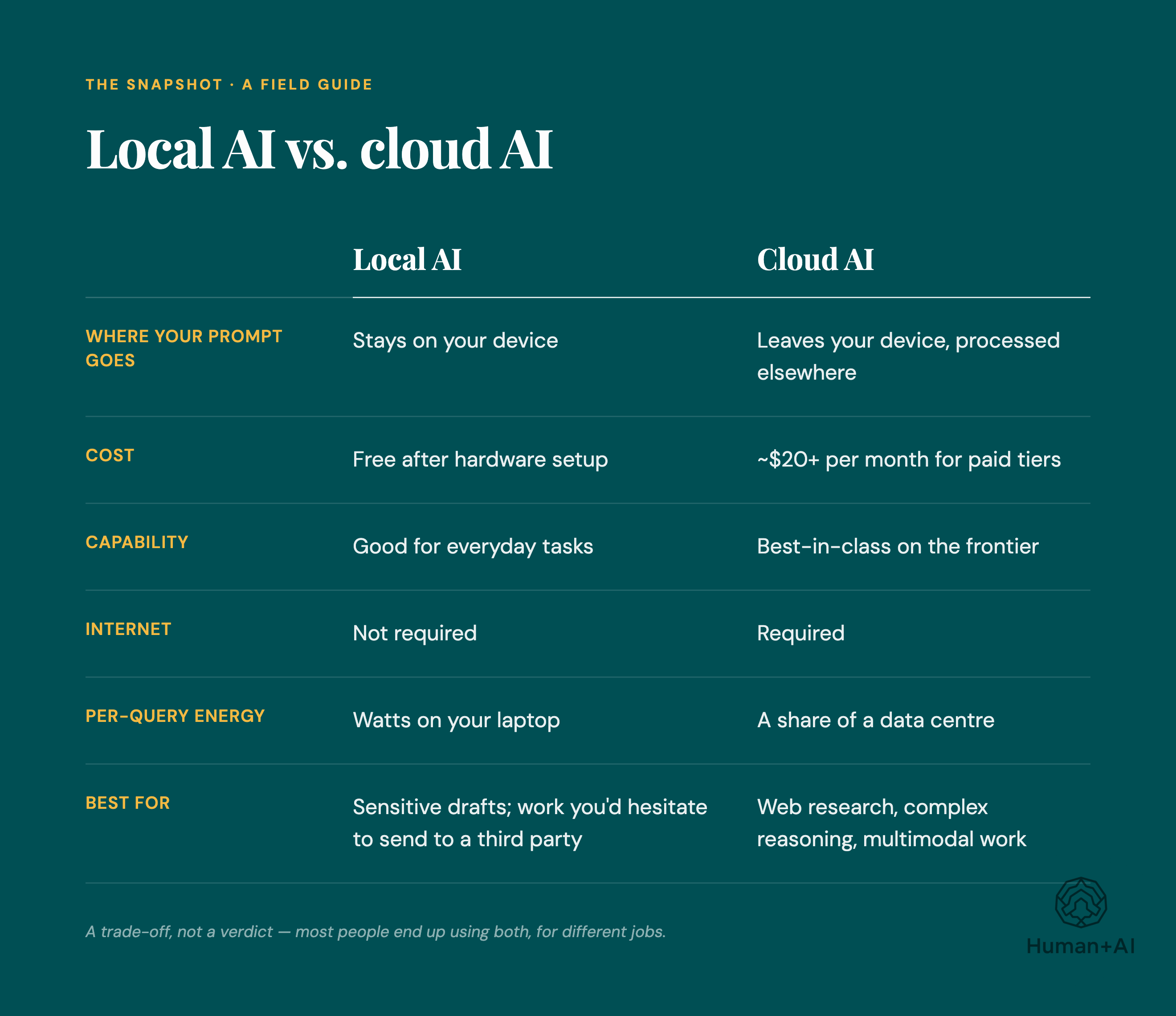
    What Is Local AI and When Should It Be Used ~ Plugable Technologies
    What Is Local AI and When Should It Be Used ~ Plugable Technologies

    Your most sensitive data may not be leaking through hackers — it may be leaving through perfectly approved productivity tools. For law firms, defense contractors, healthcare companies, financial teams, and R&D labs, the big question is no longer “Which model is smartest?” It is “Where does our data go when someone hits Enter?”

    Local LLMs and cloud AI can both be powerful, but they are not equal when privacy, compliance, and control matter. The right choice depends on your risk tolerance, workload, budget, and how much operational complexity your team can handle.

    Quick Answer: High-security firms should use local LLMs for confidential, regulated, or proprietary data and reserve cloud AI for low-risk tasks, public information, or heavily governed workflows. Cloud is easier and often stronger; local is harder but gives far better data control.

    1. The Real Difference: Where Your Data Lives

    The simplest way to compare local LLMs vs cloud AI is this: with cloud tools, your prompts, files, code, and context usually travel to someone else’s infrastructure. With local models, everything can stay on your own hardware, network, or private environment.

    That one difference affects almost everything:

    • Data sovereignty: Local deployment lets you decide exactly where information is stored and processed.
    • Vendor exposure: Cloud services may involve third-party infrastructure, logging, retention, and support access.
    • Compliance posture: Local systems can be designed around HIPAA, GDPR, ITAR, FINRA, SOC 2, or internal governance policies.
    • Incident blast radius: A misconfigured cloud workflow can expose more data than a locked-down local environment.

    This does not mean cloud AI is automatically unsafe. Many enterprise platforms offer strong security controls. But for high-security firms, “secure enough” is not the same as “under our control.”

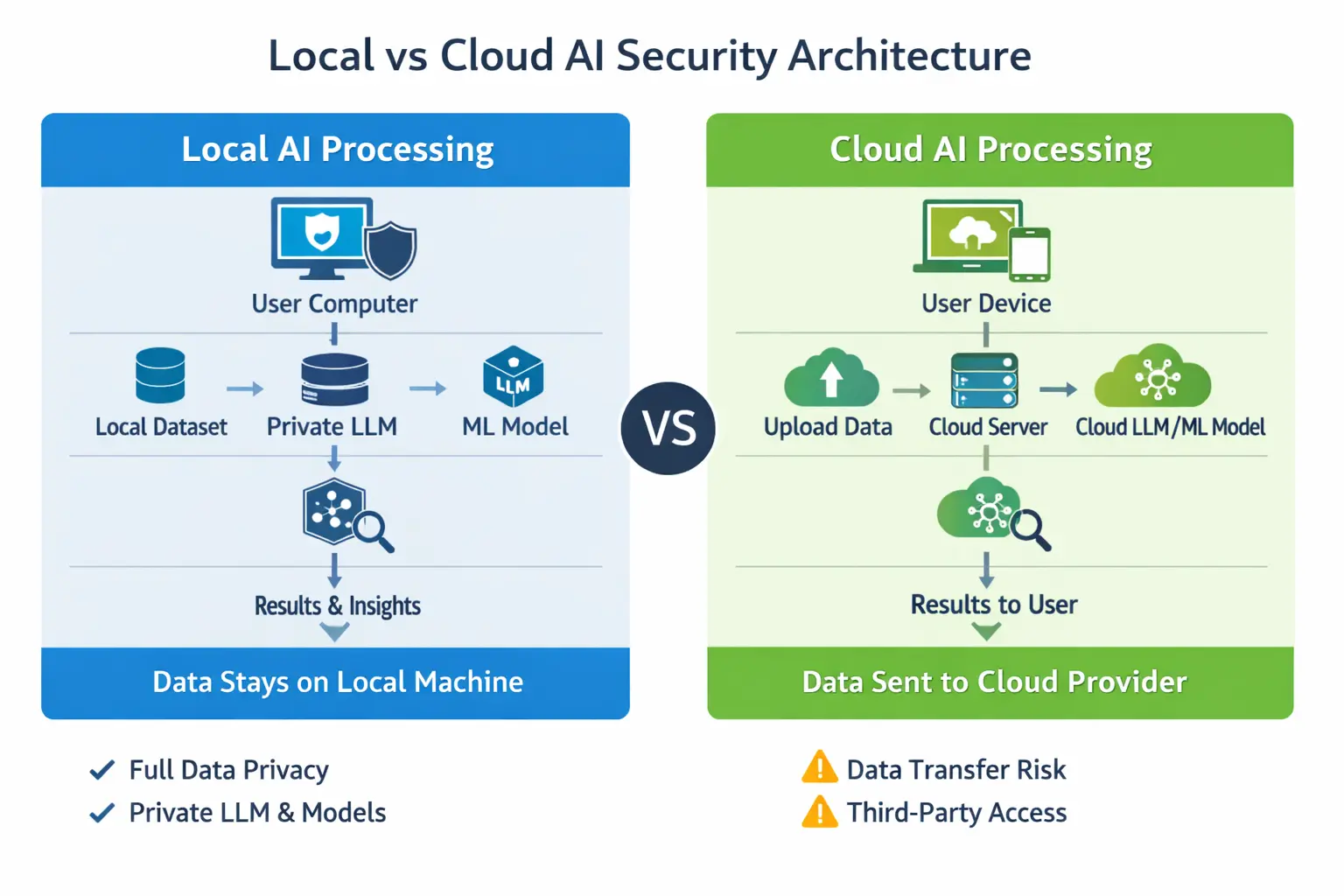
    Local vs Cloud Data Processing: Security, Privacy, and Private AI Workflows
    Local vs Cloud Data Processing: Security, Privacy, and Private AI Workflows

    2. Cloud AI Is Convenient — And That Is the Problem

    Cloud AI tools are popular because they are fast, simple, and constantly improving. Services like Claude AI and similar platforms can handle long documents, complex reasoning, drafting, research, and coding with minimal setup.

    For many teams, the advantages are obvious:

    • No hardware to buy
    • No model management
    • Better performance on difficult tasks
    • Easy collaboration
    • Frequent upgrades
    • Lower technical burden for non-engineering teams

    But convenience often creates shadow usage. Someone pastes a client contract. A developer uploads proprietary source code. An analyst drops in an acquisition target list. Nobody intends to create risk — they are just trying to move faster.

    That is why high-security firms need a written rule: cloud AI should never be the default destination for sensitive data.

    3. Local LLMs Give You Control, But Not Magic

    Local LLMs run on hardware you control: a workstation, private server, secure lab machine, on-prem cluster, or private cloud environment. Tools like LM Studio, Ollama, and private inference stacks make it increasingly practical to run capable models without sending data outside your environment.

    For privacy-first teams, local LLMs offer major benefits:

    • Prompts stay internal
    • Documents do not leave your network
    • Source code remains under your access controls
    • Logs can be disabled, restricted, or retained under your own policy
    • Models can be isolated from the internet

    But there is a tradeoff. Local models are often slower, less polished, and more demanding to operate. Agentic coding workflows, document analysis, and complex reasoning may require more attention, better prompting, smaller task chunks, and stronger review.

    In plain English: local LLMs are totally doable for small and medium-scale secure workflows, but they take discipline.

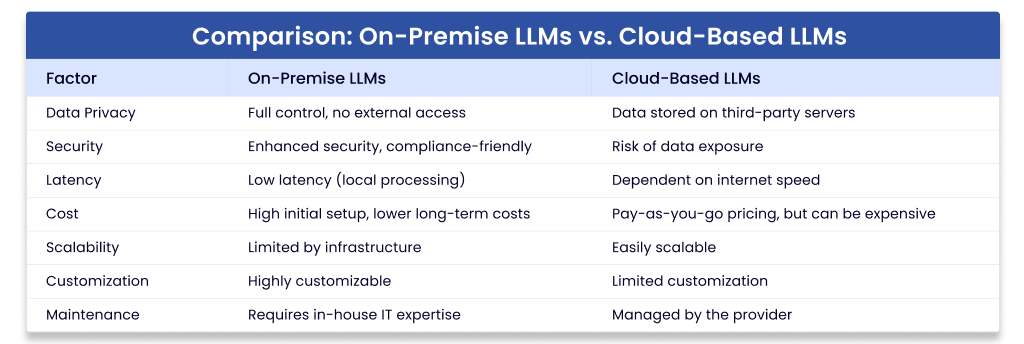
    Large Language Models On-Premise: Ultimate Guide
    Large Language Models On-Premise: Ultimate Guide

    4. Local LLMs vs Cloud AI: Side-by-Side Comparison

    Factor Local LLMs Cloud AI
    Privacy Best control; data can stay on owned hardware Depends on vendor terms, logging, retention, and configuration
    Speed to deploy Slower; requires setup and testing Fast; often ready immediately
    Model quality Good and improving, but varies by hardware and model Often stronger for reasoning, writing, and long-context work
    Compliance Easier to align with strict data residency rules Possible, but requires vendor review and contractual controls
    Cost model Upfront hardware and maintenance costs Subscription or usage-based costs
    Best for Confidential documents, code, regulated data, internal knowledge General drafting, public research, low-risk brainstorming

    5. The 7 Privacy Rules High-Security Firms Should Follow

    Rule 1: Classify Data Before Choosing a Tool

    Do not start with “Which model should we use?” Start with “What kind of data is involved?” Create simple categories:

    • Public: marketing copy, public research, published policies
    • Internal: meeting notes, process docs, non-sensitive analysis
    • Confidential: client files, contracts, financials, source code
    • Restricted: regulated records, trade secrets, national security, unreleased IP

    Public and low-risk internal work can often go to approved cloud tools. Confidential and restricted work should default to local or private deployment.

    Rule 2: Treat Prompts as Data

    Many firms protect files but forget prompts. A prompt can contain client names, deal terms, security architecture, credentials, source code, medical details, or litigation strategy.

    If you would not email it to an outside vendor, do not paste it into an unapproved cloud tool.

    Rule 3: Lock Down Local Models Like Any Other Sensitive System

    Local does not automatically mean secure. You still need proper controls:

    • Role-based access
    • Encrypted storage
    • Network segmentation
    • No unnecessary internet access
    • Audit logs where appropriate
    • Patch management
    • Secure model and dataset storage

    For a small secure setup, a dedicated workstation with a strong GPU can be enough. Consider a high-memory workstation or secure mini-server [AMAZON_LINK], encrypted external backup drive [AMAZON_LINK], and hardware security key [AMAZON_LINK] for administrator access.

    Rule 4: Use Cloud Only With Enterprise Controls

    If your firm uses cloud AI, use enterprise-grade plans and review the terms carefully. Look for:

    • No training on your business data by default
    • Clear data retention settings
    • Admin controls and user management
    • Single sign-on
    • Audit logging
    • Regional data handling options
    • Contractual privacy and security commitments

    Free or consumer accounts should not be used for regulated, proprietary, or client-sensitive work.

    Rule 5: Separate Coding Workflows by Risk

    Agentic coding is one of the biggest pressure points. Developers want fast help, but source code can reveal product strategy, vulnerabilities, credentials, architecture, and customer logic.

    A practical policy looks like this:

    1. Use local models for proprietary source code, security reviews, and internal repositories.
    2. Use cloud tools only for generic programming questions or open-source examples.
    3. Never paste secrets, tokens, environment files, or private keys into any model.
    4. Require human review before applying generated code.

    For developer-friendly local testing, LM Studio [AMAZON_LINK] and Ollama [AMAZON_LINK] are approachable starting points, especially for teams experimenting before building a larger internal platform.

    Rule 6: Watch Out for Hidden Data Paths

    Privacy risk is not only about prompts. High-security firms should also inspect:

    • Telemetry from desktop apps
    • Crash reports
    • Browser extensions
    • Chat history exports
    • Vector databases and embeddings
    • Third-party plugins
    • Connected cloud storage

    Embeddings matter too. If you build a retrieval system from confidential documents, the index itself can become sensitive. Store it like protected data.

    Rule 7: Build a Hybrid Policy, Not a Religious War

    The best answer is rarely “local only” or “cloud only.” Most high-security firms should use a hybrid model:

    • Local LLMs: confidential documents, internal knowledge bases, private code, regulated records
    • Cloud AI: public research, marketing drafts, generic brainstorming, non-sensitive summarization
    • Private cloud or dedicated enterprise deployment: larger workloads that need scale plus stronger controls

    This gives teams speed where risk is low and control where risk is high.

    A beginner's guide to local AI in 2026 - by Nicolle Weeks
    A beginner’s guide to local AI in 2026 – by Nicolle Weeks

    6. Recommended Decision Framework

    Use this simple test before approving any workflow:

    1. Would this data create legal, financial, client, or security harm if exposed? If yes, keep it local or private.
    2. Is the task generic? If yes, cloud may be acceptable.
    3. Does the vendor contract clearly protect your data? If no, do not use cloud for sensitive work.
    4. Can the local model perform well enough? If yes, local is safer.
    5. Is speed more important than confidentiality? For high-security firms, the answer should almost never be yes.

    FAQ

    Is Claude AI safe for confidential business data?

    It depends on your plan, settings, contract, and data policy. Enterprise-grade controls may be appropriate for some business use, but high-security firms should not paste confidential, regulated, or client-sensitive data into any cloud tool without legal, security, and compliance approval.

    What is LM Studio used for?

    LM Studio helps users run local models on their own machines through a friendly interface. It is useful for testing local workflows, experimenting with private document analysis, and giving teams a simpler entry point before investing in larger infrastructure.

    Are local LLMs completely private?

    They can be highly private, but only if configured correctly. Privacy depends on network isolation, storage security, access controls, logging, telemetry settings, and how users handle files and outputs.

    Are local models good enough for professional work?

    Yes, for many tasks: summarizing internal documents, drafting policies, searching knowledge bases, reviewing code, and assisting with routine analysis. For very complex reasoning or long-context work, top cloud systems may still perform better.

    What hardware do we need to run local models?

    Small teams can start with a powerful workstation, enough RAM, and a capable GPU [AMAZON_LINK]. Larger teams may need dedicated inference servers, secure storage, and centralized access controls.

    Microsoft AI Security Layers Review
    Microsoft AI Security Layers Review

    Final Recommendation

    For high-security firms, the safest strategy is clear: make local LLMs the default for sensitive work and use cloud AI only for approved, low-risk tasks. Cloud tools are excellent for speed and convenience, but local deployment gives you the privacy, sovereignty, and compliance control that regulated teams actually need.

    If your data is public, use the fastest approved tool. If your data is confidential, proprietary, regulated, or client-owned, keep it local, private, and tightly governed. That single rule will prevent most of the mistakes firms make when adopting these tools.

  • Why Does Your Business Need Repository Intelligence That Understands Code History? [AI Overview]


    Quick Answer: Repository intelligence is AI that maps your whole codebase, its history, ownership, dependencies, and change patterns before making recommendations. Businesses need it because ordinary coding assistants can read files, but they usually do not know why code exists, who owns it, what changes together, or which risks a pull request creates.

    What is repository intelligence?

    Repository intelligence means AI that understands the entire software repository before suggesting code, reviews, tests, documentation, or refactors. It looks beyond the file being edited and builds context from relationships, history, patterns, ownership, and intent.

    In plain language, it is the difference between an autocomplete tool and a system that understands how your engineering organization actually works. It can connect source files, commits, pull requests, incidents, tests, architecture decisions, and team behavior into one usable model.

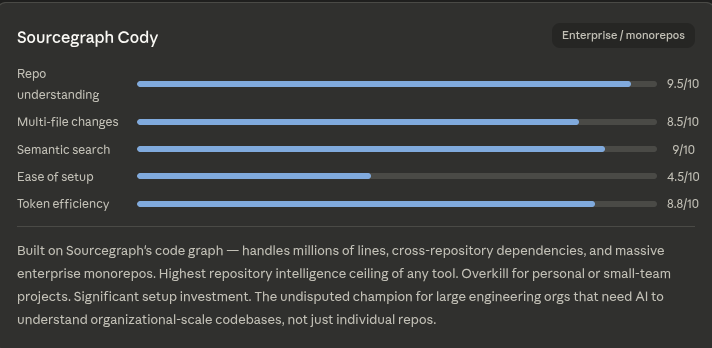
    This is why phrases such as “knowledge graph for Claude Code,” “GitHub code graph,” and “code review graph git repo” are becoming important. Teams want AI agents that reason over the repository, not just generate isolated snippets.

    Why do normal AI coding agents miss critical context?

    Most AI coding agents read files, prompts, and nearby context, but they do not automatically know the operational meaning of a repository. They may not know who owns a module, which files change together, which code is dead, or why a design was chosen.

    That gap matters because business code is full of invisible history. A payment function, for example, may look messy because it encodes compliance rules, migration constraints, or past outage fixes.

    Without repository intelligence, an AI agent can confidently suggest changes that are locally correct but globally dangerous. It may optimize a function while breaking an integration, removing a workaround, or ignoring an architecture decision record.

    How does code history make AI recommendations safer?

    Code history shows what changed, when it changed, who changed it, and what happened afterward. AI that understands this history can separate accidental complexity from intentional design.

    Commit patterns reveal hotspots, fragile modules, and areas where small edits often create large review cycles. Pull request history shows reviewers, ownership, dependency chains, and recurring failure modes.

    This is the value behind a better code-review-graph: it lets AI inspect the social and technical graph around a change. A smart review agent can say, “This file usually changes with these three test suites,” or “This module is owned by the infrastructure team.”

    What should repository intelligence map inside a codebase?

    A useful repository intelligence system should map code structure, change history, ownership, tests, documentation, and architectural intent. The goal is to build a living model of how the repository behaves, not a static index of files.

    1. Code relationships: imports, dependencies, function calls, service boundaries, APIs, and shared libraries.
    2. Change relationships: files that frequently change together, risky modules, release branches, and migration paths.
    3. Human ownership: likely maintainers, reviewers, domain experts, and teams responsible for each area.
    4. Quality signals: tests, flaky areas, coverage gaps, lint patterns, open issues, and prior incidents.
    5. Intent records: ADRs, design notes, documentation, commit messages, and pull request discussions.

    Writing good documentation, thorough tests, and clear ADRs used to be expensive, so teams skipped them. Now AI can help generate and maintain these artifacts quickly, especially when grounded in repository history.

    How does repository intelligence improve code review?

    Repository intelligence improves code review by giving reviewers and AI agents the context needed to judge risk. It can identify hidden dependencies, missing tests, unusual ownership patterns, and changes that conflict with past decisions.

    A basic AI review may comment on style, naming, or obvious bugs. A repository-aware review can detect that a change touches a high-risk billing path, bypasses a historical guardrail, or omits a companion migration.

    Searches like “Tirth 8205 code review graph” and “better code-review-graph” reflect a broader need: teams want review systems that understand relationships. A graph-based review layer helps turn pull requests into structured knowledge, not just comment threads.

    Approach What it understands Best use Main limitation
    File-level AI assistant Current file and prompt context Small edits and boilerplate Weak repository awareness
    Search-based code assistant Indexed symbols and text matches Finding references quickly Limited intent and history
    GitHub code graph Code links, dependencies, and repository structure Navigation and impact analysis May not include deep business context
    Repository intelligence platform Code, history, ownership, reviews, tests, and ADRs Safe AI coding, review, documentation, and refactoring Requires integration and governance

    How can Claude Code benefit from a repository knowledge graph?

    Claude Code can become more useful when paired with a repository knowledge graph that supplies structured context. Instead of relying only on prompts and open files, it can reason over dependencies, ownership, historical decisions, and review patterns.

    This is why searches such as “Repowise dev claude code prompts” and “knowledge graph for Claude Code” are practical rather than theoretical. Developers want prompts that ask the agent to inspect repository maps before proposing changes.

    1. Ask the agent to identify related files before editing.
    2. Ask it to inspect commit history for the affected module.
    3. Ask it to find tests that usually change with the target files.
    4. Ask it to summarize architectural decisions before refactoring.
    5. Ask it to recommend reviewers based on ownership history.

    What business problems does repository intelligence solve?

    Repository intelligence helps businesses reduce engineering risk, accelerate onboarding, improve review quality, and preserve institutional knowledge. It turns scattered repository activity into a strategic asset.

    For leaders, the value is not simply “AI writes more code.” The value is that AI can help teams change the right code, understand consequences sooner, and avoid rediscovering old decisions.

    It is especially useful in mature repositories where no single developer understands everything. When senior engineers leave, repository intelligence can preserve context that would otherwise disappear into commit history and Slack archives.

    How should a business adopt repository intelligence?

    A business should adopt repository intelligence by starting with high-value workflows such as code review, onboarding, documentation, and risky refactors. The best rollout connects AI to repository facts before giving it authority to change production code.

    1. Index the repository: map files, symbols, dependencies, tests, and documentation.
    2. Add history: connect commits, pull requests, incidents, releases, and ownership signals.
    3. Build review workflows: use the graph to flag risky changes and missing context.
    4. Generate missing knowledge: create ADR drafts, test plans, and documentation summaries.
    5. Measure outcomes: track review time, defect escape rate, onboarding speed, and refactor confidence.

    The goal is not to replace engineers. The goal is to give engineers an AI partner that understands the repository as a system.

    Is repository intelligence only for large engineering teams?

    No, repository intelligence is useful for small teams as well as large organizations. Small teams benefit because they often lack time to maintain documentation, tests, and architectural records manually.

    In a startup, repository intelligence can prevent early technical debt from becoming invisible. In an enterprise, it can coordinate knowledge across hundreds of services, owners, and compliance constraints.

    Can repository intelligence detect dead code?

    Yes, repository intelligence can help identify dead or low-value code by combining static references, runtime signals, test usage, and change history. It is more reliable than simple search because it can consider whether code is still owned, tested, deployed, or changed with active features.

    Dead code detection should still be validated by engineers. The AI can rank likely candidates and explain the evidence, but deletion remains a business and operational decision.

    Does repository intelligence replace documentation?

    No, repository intelligence does not replace documentation; it makes documentation easier to create, verify, and maintain. AI can draft docs from code history, ADRs, pull requests, and tests, then keep them aligned as the repository changes.

    The strongest approach is a feedback loop. Human decisions become written records, and repository-aware AI uses those records to make safer future recommendations.

  • Stop Letting Coding Agents Guess: 7 Reasons Your Business Needs Repository Intelligence


    Repository Intelligence Why AI Now Needs to Understand Your Codebase, Not  Just Code
    Repository Intelligence Why AI Now Needs to Understand Your Codebase, Not Just Code

    Your coding agent can read the file in front of it, but that does not mean it understands your business. Most bad suggestions do not come from weak syntax knowledge; they come from missing context about why the code exists, who owns it, and what usually breaks with it.

    That is where repository intelligence changes the game. Instead of treating your repo like a folder of files, it turns it into a living map of history, dependencies, ownership, risks, and intent.

    Quick Answer: Repository intelligence helps coding agents understand your full codebase, not just the open file. It maps code history, ownership, change patterns, dependencies, tests, documentation, and architectural decisions so suggestions are safer, faster, and more useful.

    What Is Repository Intelligence?

    Repository intelligence is the practice of building a deep, connected understanding of your codebase before making recommendations, writing code, reviewing pull requests, or generating documentation.

    Think of it like the difference between asking a new developer to fix a bug on day one versus asking a senior engineer who has worked on the product for five years. The senior engineer knows:

    • Which files usually change together
    • Which modules are risky to touch
    • Who owns a service or feature
    • Which parts of the system are legacy or dead code
    • Why a strange workaround exists
    • Where tests are missing or unreliable
    • Which architectural decisions shaped the current design

    Repository intelligence gives your coding workflow more of that senior-engineer context. It does not just inspect code. It connects code to history, behavior, ownership, intent, and business risk.

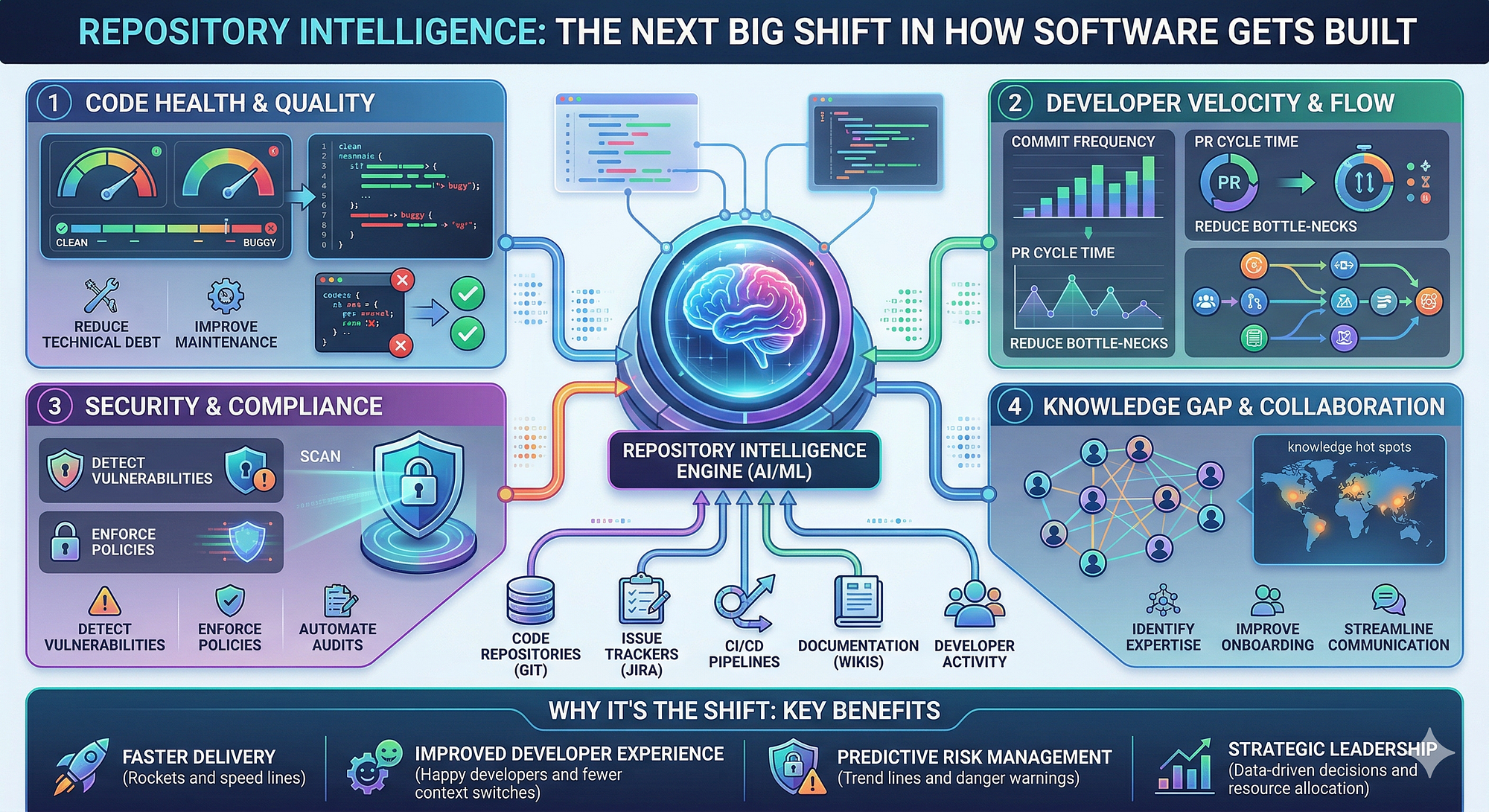
    Repository Intelligence: The Next Big Shift in How Software Gets Built | by  Andi permana | Apr, 202
    Repository Intelligence: The Next Big Shift in How Software Gets Built | by Andi permana | Apr, 202

    Why Normal Coding Agents Still Miss the Big Picture

    Most coding agents are good at local tasks. Ask them to explain a function, refactor a class, or write a unit test, and they can often help. But businesses do not fail because one function was slightly messy. They lose time because changes ripple through systems nobody fully understands.

    Your coding agent may read files, but it usually does not automatically know:

    • Who last maintained a module
    • Which files are frequently changed in the same pull request
    • Which tests have historically failed around that area
    • Which old decisions explain the current architecture
    • Which code is unused but still dangerous to remove
    • Which service boundaries should not be crossed

    That gap creates confident but risky output. The code may look correct in isolation while quietly violating an architectural pattern, duplicating existing logic, or breaking an unspoken dependency.

    7 Reasons Your Business Needs Repository Intelligence

    1. It Makes Code Suggestions Safer

    The biggest benefit is simple: fewer bad changes.

    When a coding agent understands the repository graph, it can see relationships between files, services, packages, owners, and previous changes. That means it can avoid suggestions that look fine locally but are dangerous globally.

    For example, if two files almost always change together, repository intelligence can flag that relationship. If a proposed change touches a payment service with weak test coverage, it can raise the risk level. If a function looks unused but is called through reflection, config, or a generated route, the system can warn before someone deletes it.

    2. It Improves Code Review Quality

    A good code review is not just “does this compile?” It asks, “Does this change fit the system?”

    Repository intelligence can support better reviews by surfacing:

    • Related files reviewers should inspect
    • Past bugs in the same area
    • Ownership signals for better reviewer assignment
    • Risky dependencies affected by the change
    • Missing tests based on historical patterns

    This is where concepts like a code review graph, GitHub code graph, or knowledge graph for a coding agent become practical. The goal is not to make review more complicated. It is to help reviewers spend their attention where it matters most.

    3. It Captures Tribal Knowledge Before It Disappears

    Every engineering team has invisible knowledge. Someone knows why the billing module is weird. Someone remembers why the monolith cannot call a certain service directly. Someone knows which cron job looks dead but must never be removed.

    The problem? People change teams. They leave. They forget.

    Repository intelligence helps convert that tribal knowledge into a navigable system by connecting:

    • Pull request discussions
    • Commit history
    • Architecture decision records
    • Documentation
    • Test behavior
    • Ownership metadata
    • Issue tracker context

    This is especially valuable because documentation, tests, and ADRs used to be expensive to maintain. Teams skipped them because deadlines won. Now, generating and updating them can be much faster, especially when the system already understands the repository context.

    4. It Helps New Developers Ramp Up Faster

    Onboarding is one of the most expensive hidden costs in engineering. A new developer may spend weeks asking, “Where is this handled?” or “Why is this built this way?”

    With repository intelligence, a new teammate can ask better questions and get better answers:

    • “What owns user authentication?”
    • “Which services does checkout depend on?”
    • “What changed the last time this test failed?”
    • “Who should review changes in this directory?”
    • “Is this module actively maintained?”

    Instead of wandering through folders, they get a map. That means faster ramp-up, fewer interruptions for senior engineers, and less risk from early mistakes.

    5. It Finds Dead Code and Hidden Risk

    Most mature codebases contain code nobody wants to touch. Some of it is truly dead. Some of it is critical but poorly understood. The hard part is telling the difference.

    Repository intelligence can help identify:

    • Files that have not changed in years
    • Modules with no clear owner
    • Code with declining test coverage
    • Areas with high bug frequency
    • Functions that appear unused but are indirectly referenced

    This gives leaders a clearer view of technical debt. Not vague complaints like “the codebase is messy,” but specific, evidence-backed signals about where risk lives.

    6. It Makes Documentation and Tests Easier to Maintain

    Documentation often fails because it is separate from the work. Someone writes it once, then the code changes, and the docs slowly rot.

    Repository intelligence can reduce that gap by connecting documentation to actual code paths, ownership, and change history. When a core workflow changes, the system can identify related docs, tests, and ADRs that may need updates.

    The same applies to tests. Instead of blindly generating tests for a single file, a smarter workflow can ask:

    • What behavior is this module responsible for?
    • Which tests already cover related paths?
    • What edge cases caused bugs before?
    • Which integration points are most fragile?

    That leads to tests that are not just more numerous, but more relevant.

    7. It Gives Engineering Leaders Better Decisions

    Repository intelligence is not only for developers. It helps managers, architects, and technical leaders answer business-critical questions:

    • Where are we carrying the most risk?
    • Which systems depend on one or two people?
    • Which parts of the product slow delivery?
    • Where should we invest in refactoring?
    • Are teams following architectural boundaries?

    This turns engineering planning from opinion-driven to evidence-driven. Instead of relying only on gut feel, leaders can use repository signals to prioritize the work that improves velocity and reliability.

    Repository Intelligence: Why the Next Big Skill Isn't Coding, It's Teaching AI  Your Entire Codebase
    Repository Intelligence: Why the Next Big Skill Isn’t Coding, It’s Teaching AI Your Entire Codebase

    Repository Intelligence vs. Basic Code Search

    Capability Basic Code Search Repository Intelligence
    Finds text in files Yes Yes
    Understands file relationships Limited Strong
    Uses commit and PR history No Yes
    Identifies ownership No Yes
    Flags risky changes No Yes
    Connects docs, tests, and ADRs No Yes
    Supports better review routing No Yes

    What to Look for in a Repository Intelligence System

    If you are evaluating this for your business, do not stop at “can it read code?” That is the bare minimum. Look for a system that can build a rich map of your repository over time.

    Prioritize these capabilities:

    • Code graph mapping: Understands dependencies, imports, calls, services, and shared components.
    • Git history analysis: Uses commits and pull requests to detect change patterns.
    • Ownership detection: Identifies likely maintainers and reviewers.
    • Risk scoring: Flags fragile areas based on churn, bugs, coverage, and complexity.
    • Documentation awareness: Connects code to docs, ADRs, tickets, and design notes.
    • Review assistance: Suggests what reviewers should inspect and why.
    • Security and privacy controls: Respects your source code, permissions, and compliance needs.
    Repository Intelligence: The Next Big Shift in How Software Gets Built | by  Andi permana | Apr, 202
    Repository Intelligence: The Next Big Shift in How Software Gets Built | by Andi permana | Apr, 202

    How to Start Without Boiling the Ocean

    You do not need to map everything perfectly on day one. Start with one high-value workflow.

    1. Pick a painful area: Choose code review, onboarding, test generation, or technical debt discovery.
    2. Connect your repository history: Include commits, pull requests, file changes, and ownership signals.
    3. Map relationships: Identify services, packages, modules, tests, and docs that connect to each other.
    4. Use it in real work: Apply it to active pull requests or onboarding tasks.
    5. Measure outcomes: Track review time, escaped bugs, onboarding speed, and developer satisfaction.

    The best approach is practical. Do not build a beautiful graph nobody uses. Build a useful map that helps teams make better changes this week.

    FAQ

    What is repository intelligence in simple terms?

    Repository intelligence is a deeper understanding of your codebase that includes code relationships, Git history, ownership, documentation, tests, and architectural intent. It helps coding agents and teams make better decisions because they can see the full context, not just one file.

    Is repository intelligence the same as a code graph?

    Not exactly. A code graph is usually one part of repository intelligence. Repository intelligence may include a code graph, but it also includes change history, pull request patterns, ownership, test coverage, docs, ADRs, and risk signals.

    How does repository intelligence improve code review?

    It helps reviewers understand what else might be affected by a change. It can suggest related files, identify risky modules, recommend reviewers, and surface historical context from past bugs or pull requests.

    Do small engineering teams need repository intelligence?

    Yes, especially if the product is growing. Small teams often rely heavily on memory and informal knowledge. Repository intelligence helps preserve that knowledge before complexity increases or key people move on.

    Can repository intelligence help with documentation?

    Absolutely. It can identify which docs relate to which code paths, detect when docs may be stale, and help teams create better ADRs, onboarding guides, and test plans based on real repository context.

    Multi-Repo Intelligence: How Can AI Understand Microservices
    Multi-Repo Intelligence: How Can AI Understand Microservices

    Final Recommendation

    If your business uses coding agents without repository intelligence, you are asking them to work like a developer who just joined the company five minutes ago. They may be helpful, but they are still guessing.

    The best next step is to add a repository intelligence layer before relying on automated code suggestions, reviews, or refactors at scale. Start with code review or onboarding, connect your Git history and ownership signals, and build from there. Your team will move faster, but more importantly, they will move with far less risk.

  • Which Is Better in 2026: Real-Time Translation Earbuds or Smartphone Apps? [AI Overview]


    Quick Answer: In 2026, real-time translation earbuds are best for natural, face-to-face conversations, travel, meetings, and multilingual collaboration because they allow continuous hands-free dialogue. Smartphone translation apps are better for free or low-cost translation, text, menus, signs, occasional speech translation, and Android users who want an earbud translator app free option.

    Are real-time translation earbuds better than smartphone apps in 2026?

    Real-time translation earbuds are better for live conversation because they reduce friction, keep your hands free, and make multilingual dialogue feel more natural. Smartphone apps are still better for affordability, text translation, camera translation, and casual use.

    The real answer depends on the situation: earbuds win when people need to speak continuously, while apps win when translation is occasional or budget-sensitive. In 2026, language barriers are not fully gone, but they are much easier to manage than before.

    AI-powered translation now captures meaning, context, and tone more effectively than older phrase-based tools. Some modern earbuds, such as Timekettle-style devices, advertise support for dozens of languages and very low delay, sometimes around half a second in ideal conditions.

    What is the best choice for real-time natural conversations?

    Translation earbuds are the best choice for real-time natural conversations because they allow two people to speak and listen without repeatedly passing a phone back and forth. They are designed for continuous, seamless cross-language communication.

    This matters in business meetings, classrooms, medical front desks, international travel, and social conversations where flow is important. A phone app can translate speech well, but it often interrupts eye contact and conversation rhythm.

    Earbuds also make group or paired communication easier when both users have compatible devices or when the system supports speaker mode. The trade-off is that earbuds usually cost more and may require a companion app, account, or subscription for advanced features.

    Which option is more accurate: translator earbuds or phone apps?

    Accuracy is often similar when earbuds and apps use the same cloud AI translation engines, but earbuds can feel more accurate in conversation because they capture speech continuously. Smartphone apps may be more accurate for text, documents, signs, and carefully spoken phrases.

    In noisy environments, accuracy depends heavily on microphone quality, noise cancellation, speaker clarity, accent recognition, and internet connection. Premium earbuds may outperform a phone microphone in crowded places, but a flagship smartphone can still perform very well.

    For important legal, medical, or immigration decisions, neither earbuds nor free apps should be treated as a certified human interpreter. They are excellent aids, not perfect replacements for professional translation in high-risk settings.

    How do real-time translation earbuds and smartphone apps compare?

    Earbuds are strongest for live speech, while smartphone apps are strongest for flexibility and cost. The table below compares the most common options people consider in 2026.

    Option Best For Strength Limitation
    Real-time translation earbuds Travel, meetings, live conversations Hands-free, natural, continuous speech translation Higher upfront cost and possible subscription
    Google Translate on Android or iPhone Free everyday translation Text, camera, voice, offline language packs Less natural for long two-way conversations
    Microsoft Translator Group conversations and business use Multi-person conversation features Requires setup and stable connectivity
    DeepL, iTranslate, or similar apps High-quality text and travel phrases Strong written translation and tone handling Some best features require paid plans

    What is the best free earbud translator app for Android?

    The best free Android option is usually not a dedicated earbud-only translator app, but Google Translate paired with Bluetooth earbuds. This gives you free speech translation, conversation mode, text translation, and camera translation without buying special translation earbuds.

    Android users can also try Microsoft Translator for multilingual group conversations. If you already own standard wireless earbuds, they can act as your microphone and audio output, but they will not provide the same seamless dual-ear experience as purpose-built translator earbuds.

    Some translator earbud brands require their own Android app to activate real-time features. Before buying, check whether the app is free, whether offline translation is included, and whether premium language packs or conversation modes require payment.

    Which option is cheaper in 2026?

    Smartphone apps are cheaper because many core translation features are free. Translation earbuds cost more upfront, but they may be worth it for frequent travelers, international teams, and people who need daily multilingual conversations.

    A free Android app can solve most occasional translation problems, including menus, signs, short conversations, and text messages. Paid apps or subscriptions may add better offline access, higher limits, improved voice tools, or business features.

    Earbuds are a hardware investment, so the real cost includes the device, replacement case or tips, app access, subscription fees, and battery lifespan. If you translate only a few times per month, a phone app is usually the smarter buy.

    When should you choose translation earbuds instead of a phone app?

    You should choose translation earbuds when conversation flow matters more than saving money. They are ideal for situations where pulling out a phone repeatedly feels awkward, slow, or unprofessional.

    1. Choose earbuds for live meetings, negotiations, conferences, guided tours, and long face-to-face conversations.
    2. Choose earbuds when you need hands-free communication while walking, working, shopping, or navigating a new city.
    3. Choose earbuds when you want faster turn-taking and less interruption between speakers.
    4. Choose earbuds when the other person is comfortable using shared, paired, or speaker-based translation modes.

    The biggest benefit is convenience. The biggest drawback is that performance can still depend on internet access, supported languages, accents, and background noise.

    When should you choose a smartphone translation app instead of earbuds?

    You should choose a smartphone app when you want the most affordable and versatile translation tool. Apps are better for text-to-text translation, menus, signs, websites, messages, and quick spoken phrases.

    1. Use a phone app for free Android translation, especially with Google Translate or Microsoft Translator.
    2. Use a phone app for camera translation of restaurant menus, street signs, labels, and documents.
    3. Use a phone app when you need to copy, edit, save, or share translated text.
    4. Use a phone app when you are testing translation needs before buying dedicated earbuds.

    Apps are also easier to update and compare. If one app struggles with a phrase, you can quickly try another tool such as DeepL, iTranslate, or a built-in phone assistant.

    What features should you compare before buying translator earbuds?

    You should compare language support, latency, offline capability, battery life, microphone quality, and app pricing before buying translator earbuds. The best device is not always the one with the longest language list.

    1. Check whether your exact language pair is supported, including regional variants.
    2. Look for low-latency translation, ideally close to real-time in normal conversation.
    3. Confirm whether offline translation is available for your languages.
    4. Review subscription terms, privacy settings, and data handling.
    5. Test comfort, battery life, charging case quality, and noise cancellation.

    Language count can be misleading because support quality varies by language. A tool that handles English-Spanish very well may be weaker for less common language pairs.

    Will translation earbuds and apps end language barriers in 2026?

    They will reduce language barriers dramatically, but they will not completely end them. Translation technology in 2026 is powerful enough for travel, work, learning, and social communication, but it can still miss nuance, humor, culture, and emotion.

    The biggest breakthrough is that translation is becoming instant and ordinary. People can now speak, listen, read, and respond across languages with far less preparation than before.

    The best setup for many users is a hybrid approach: use earbuds for live conversation and smartphone apps for text, camera, and backup translation. Together, they make cross-language communication more practical than ever.

    What is the final verdict on real-time translation earbuds vs smartphone apps?

    The final verdict is simple: buy translation earbuds if you need frequent, natural, real-time conversations, and use smartphone apps if you want free or low-cost translation for everyday tasks. In 2026, neither option is universally best.

    For travelers and professionals, earbuds can feel like a genuine language-barrier breakthrough. For casual users, a free Android translation app with regular Bluetooth earbuds may be enough.

    If you are unsure, start with a free smartphone app first. Upgrade to translator earbuds only when you know you need smoother, faster, hands-free multilingual conversation.

    Are translator earbuds better than Google Translate?

    Translator earbuds are better than Google Translate for natural live conversations, but Google Translate is better for free text, camera, and general-purpose translation. Many people benefit from using both.

    Can I use normal Bluetooth earbuds for translation?

    Yes, normal Bluetooth earbuds can work with translation apps on Android or iPhone. However, they usually do not offer the same integrated real-time conversation experience as dedicated translator earbuds.

    Do translation earbuds work offline?

    Some translation earbuds support offline translation, but offline language options are usually more limited than online translation. Always check whether your specific language pair works offline before relying on it while traveling.

    What is the best option for international travel?

    The best travel setup is translator earbuds for conversations plus a smartphone app for signs, menus, and text. This combination covers the widest range of real-world travel situations.

  • 7 Key Differences Between Real-Time Translation Earbuds and Smartphone Apps in 2026


    Forget Rosetta Stone: Real-time AI tools that end the language barrier -  Komando.com
    Forget Rosetta Stone: Real-time AI tools that end the language barrier – Komando.com

    You can now have a conversation with someone who speaks another language without awkward pauses, frantic typing, or passing your phone back and forth. But here’s the catch: not every translation tool feels natural in real life. In 2026, the big question isn’t “Can technology translate?” — it’s “Which tool should you trust when the conversation actually matters?”

    Quick Answer: Translation earbuds are better for natural, face-to-face conversations because they allow more continuous, hands-free communication. Smartphone translation apps are better for casual use, text translation, signs, menus, and anyone who wants a free or low-cost option.

    Real-Time Translation Earbuds vs Smartphone Apps: What’s the Real Difference?

    Both translator earbuds and smartphone apps are designed to solve the same problem: helping people understand each other across languages. But they do it in very different ways.

    Smartphone apps usually require you to open an app, choose languages, tap a microphone, speak, wait, and then show or play the translation. They’re excellent for short exchanges, travel basics, reading menus, and translating written text.

    Translation earbuds, on the other hand, are built for live conversations. You wear them, the other person may wear one too, and the translation plays directly into your ear. Some models support dozens of languages and advertise very low delay times, sometimes around half a second depending on connection, language pair, and environment.

    So, are earbuds the end of language barriers in 2026? For natural conversation, they’re the closest thing we’ve had so far. But phone apps still have a strong place.

    Real-Time Translation Earbuds in 2026: A Complete Buyer's Guide – Timekettle
    Real-Time Translation Earbuds in 2026: A Complete Buyer’s Guide – Timekettle

    1. Accuracy: Which One Translates Better?

    Accuracy depends on three things: the language pair, background noise, and how clearly people speak. In perfect conditions, both modern earbuds and phone apps can be impressively accurate for common languages like Spanish, French, German, Mandarin, Japanese, and English.

    However, there are differences:

    • Smartphone apps are often better for text, signs, menus, and written translation.
    • Earbuds are better for spoken back-and-forth conversation.
    • Apps may win when you need to double-check a sentence visually.
    • Earbuds may win when you want to keep eye contact and avoid interrupting the flow.

    If you’re translating legal, medical, or highly technical information, don’t rely blindly on either. For everyday conversation, travel, meetings, and social situations, both can work well — but earbuds feel more human.

    2. Convenience: Hands-Free vs Phone-in-Hand

    This is where translation earbuds really shine.

    With a phone app, you usually need to:

    1. Unlock your phone.
    2. Open the translation app.
    3. Select the correct languages.
    4. Tap to speak or listen.
    5. Show or play the result.

    That’s fine at a hotel desk or restaurant. But during a fast conversation, it can feel clunky.

    With earbuds, the experience is more natural. You can listen while the other person speaks, respond faster, and keep your hands free. This matters more than people realize. Real conversation is about rhythm — pauses, facial expressions, reactions, and timing. When you’re constantly looking down at your phone, that rhythm breaks.

    The 2026 Global Communication Shift: How AI Translator Earbuds Are  Redefining Global Communication
    The 2026 Global Communication Shift: How AI Translator Earbuds Are Redefining Global Communication

    3. Cost: Free Apps vs Premium Earbuds

    If your budget is tight, smartphone apps are the obvious winner. Many are free or have generous free versions. Google Translate, Microsoft Translator, and other popular apps can handle speech, text, camera translation, and offline language packs in some cases.

    Translation earbuds, however, are a hardware purchase. Depending on the model, you may pay anywhere from budget-friendly pricing to several hundred dollars. Some also require an app for setup, language selection, or advanced modes.

    Feature Translation Earbuds Smartphone Apps
    Best for Live conversations, travel, meetings Text, signs, menus, quick phrases
    Cost Usually paid hardware Often free or low-cost
    Convenience Hands-free and more natural Requires phone interaction
    Conversation flow Stronger for continuous dialogue Better for short exchanges
    Offline use Depends on model Available in some apps
    Best value Frequent travelers or business users Casual users and budget travelers

    If you only travel once a year, a free app may be enough. If you regularly speak with people in different languages, earbuds can justify the cost quickly.

    4. Real-Life Use Cases: Which Should You Choose?

    For Travel

    If you’re ordering food, asking for directions, reading signs, or checking into a hotel, a smartphone app is usually enough. Camera translation is especially useful for menus, train stations, and product labels.

    But if you want to chat with locals, take tours, negotiate at markets, or have longer conversations, translation earbuds feel much smoother.

    For Business Meetings

    Earbuds are the stronger choice for live meetings because they allow you to stay focused on the person speaking. You’re not constantly passing a phone around or waiting for someone to tap a button.

    For documents, email, contracts, and slides, use a text-to-text translation tool or app instead. Spoken conversation and written content are different jobs.

    For Language Learning

    Apps may be better if you’re actively trying to learn. You can see the translated words, save phrases, replay audio, and compare sentence structure.

    Earbuds are better when your priority is communication, not study. They help you understand and respond, but they may not teach you as much visually.

    For Android Users Looking for Free Options

    If you searched for an “earbud translator app free Android,” here’s the practical answer: most translator earbuds require their companion app, but the earbuds themselves usually aren’t free. If you want a free Android option, start with a phone-based translator app before buying hardware.

    Imagine a world where language barriers simply vanish. The TimeKettle W4  earbuds are rewriting the
    Imagine a world where language barriers simply vanish. The TimeKettle W4 earbuds are rewriting the

    5. Speed and Delay: Do Earbuds Translate Instantly?

    No tool is truly instant, but the delay is getting shorter. Some modern translator earbuds advertise near real-time translation with delays under a second in ideal conditions. That makes conversation feel much less robotic than older devices.

    Still, speed can vary based on:

    • Internet connection quality
    • Background noise
    • Accent and speaking speed
    • Language pair
    • Whether offline mode is available

    For fast, natural interaction, earbuds generally beat phone apps because they reduce the physical steps between hearing and responding.

    6. Privacy and Comfort: The Hidden Factors

    People often compare accuracy and price, but privacy and comfort matter too.

    With smartphone apps, you’re visibly recording or translating, which may make some people uncomfortable. Earbuds can feel more discreet, but they also require trust — especially if you ask someone else to wear one of your earbuds.

    Comfort is another factor. If you dislike wearing earbuds for long periods, a phone app may be less annoying. But if you already use wireless earbuds daily, translator earbuds will feel familiar.

    Top 5 Best Translation Earbuds in 2026 | Real-Time AI Language Translation
    Top 5 Best Translation Earbuds in 2026 | Real-Time AI Language Translation

    7. Best Picks: Who Should Buy What?

    Here’s the simple buying advice:

    • Choose translation earbuds if you travel often, attend multilingual meetings, work with international clients, or want natural conversation.
    • Choose smartphone apps if you need free translation, occasional travel help, text translation, or camera translation.
    • Use both if you want the best setup: earbuds for speaking, apps for reading and checking text.

    Popular real-time translator earbud options include Timekettle translator earbuds [AMAZON_LINK], especially for users who want a dedicated device for conversations across many languages. For casual use, Google Translate for Android [AMAZON_LINK] and Microsoft Translator [AMAZON_LINK] are still practical starting points.

    Are Translation Earbuds the End of Language Barriers in 2026?

    They’re not a perfect replacement for human fluency, but they are a major leap forward. The biggest improvement is not just translation quality — it’s conversation flow. When you can speak, listen, and respond without constantly staring at a screen, communication feels more natural.

    Smartphone apps are still incredibly useful, especially because they’re cheap, accessible, and versatile. But for face-to-face communication, earbuds are becoming the more powerful choice.

    FAQ

    Are real-time translation earbuds better than smartphone apps?

    For live conversations, yes. Translation earbuds are usually better because they are hands-free and allow more continuous communication. Smartphone apps are better for text, signs, menus, and occasional use.

    Can I use translator earbuds without the internet?

    Some models offer limited offline translation, but many features work best with an internet connection. Always check the supported offline languages before buying.

    What is the best free Android translator app?

    For most Android users, a free translation app with voice, text, and camera translation is the best place to start. It’s ideal if you need quick help without buying earbuds.

    Do translation earbuds work in noisy places?

    They can, but performance may drop in loud restaurants, airports, markets, or streets. For best results, speak clearly and stay close to the person you’re talking with.

    Should I buy translator earbuds for travel in 2026?

    If you travel often or want real conversations instead of basic phrases, yes. If you only need help with menus and directions, a smartphone app may be enough.

    Final recommendation: If you want the most natural real-time conversation experience in 2026, choose translation earbuds. If you want the cheapest and most flexible option, use a smartphone app. For the smartest setup, use both: earbuds for speaking, apps for reading and text translation.

  • Which AI Offers the Best Value for Developers: Gemini 3.1 Pro or GPT-5.4? [AI Overview]


    Quick Answer: GPT-5.4 offers the best value for developers doing serious coding, agentic workflows, computer-use tasks, and premium tool orchestration. Gemini 3.1 Pro is the better value for budget-conscious developers handling standard coding, refactoring, analysis, and high-volume tasks where lower cost matters more than peak reliability.

    What is the best choice between GPT-5.4 and Gemini 3.1 Pro for developers?

    GPT-5.4 is the better choice for coding-heavy developer work where correctness, tool use, and multi-step reasoning matter most. Gemini 3.1 Pro is the better choice when cost efficiency, speed, and competent everyday coding assistance are the priorities.

    The practical verdict is simple: choose GPT-5.4 for high-stakes engineering and Gemini 3.1 Pro for affordable productivity. Gemini is surprisingly capable on standard tasks, but GPT-5.4 is stronger for serious coding work.

    How do GPT-5.4 and Gemini 3.1 Pro compare on developer value?

    GPT-5.4 delivers higher value when the task has a high failure cost, such as production code generation, agent planning, or automated debugging. Gemini 3.1 Pro delivers higher value when tasks are repetitive, bounded, or easy to verify.

    Developer value is not only about benchmark scores. It also depends on token pricing, rate limits, latency, context handling, integration depth, and how often the model gets the answer right on the first attempt.

    Model Best Use Case Developer Value Main Trade-Off
    GPT-5.4 Coding agents, tool orchestration, complex debugging Best for serious coding work Higher cost
    Gemini 3.1 Pro Budget coding, refactoring, analysis, high-volume tasks Best cost-performance option Less reliable on complex agentic workflows
    GPT-5.5 Premium overall intelligence and coding benchmarks Best if available and budget allows Likely premium pricing
    Claude Opus 4.6 Long-form reasoning, code review, careful analysis Strong alternative for coding teams May lag GPT-5.4 in tool-heavy workflows

    When should developers choose GPT-5.4?

    Developers should choose GPT-5.4 when they need the strongest coding model for complex, multi-step, production-adjacent work. It is the safer option for autonomous agents, computer-use workflows, test generation, architecture changes, and premium tool orchestration.

    GPT-5.4 is especially valuable when a wrong answer creates expensive review time. If the model must inspect files, modify code, call tools, reason across dependencies, and recover from errors, GPT-5.4 is usually worth the extra cost.

    1. Use GPT-5.4 for coding-heavy agents that need to plan, execute, and validate changes.
    2. Use GPT-5.4 for computer-use workflows involving browsers, terminals, IDEs, and external tools.
    3. Use GPT-5.4 for premium orchestration where reliability matters more than token savings.
    4. Use GPT-5.4 for complex debugging across large or unfamiliar codebases.

    When should developers choose Gemini 3.1 Pro?

    Developers should choose Gemini 3.1 Pro when they need a capable coding assistant at a lower operating cost. It is a strong choice for standard programming tasks, code explanation, refactoring, documentation, and batch analysis.

    Gemini 3.1 Pro can also outperform expectations on context-sensitive tasks. In one reported rate-limiting task, Gemini 3.1 Pro handled the work correctly and showed better contextual awareness than GPT-5.4 by reading the existing codebase more effectively.

    This makes Gemini valuable for teams that can verify outputs with tests, linters, reviews, or CI. It is not the weakest option; it is the value option.

    Which model is better for coding benchmarks?

    GPT-5.4 is generally the stronger coding model in reported developer comparisons, especially for difficult tasks. GPT-5.5 appears stronger still, with Artificial Analysis Intelligence Index reporting GPT-5.5 as the best overall model and a leader on coding.

    Benchmarks should be interpreted carefully because they do not always match your codebase. A model can score highly and still fail on hidden dependencies, project conventions, authentication flows, or legacy architecture.

    For buying decisions, combine public benchmarks with private evaluations. The best benchmark is a real pull request from your own repository.

    How does GPT-5.5 compare with Gemini 3.1 Pro?

    GPT-5.5 is the stronger premium option if you are optimizing for maximum model quality rather than cost. Gemini 3.1 Pro remains the better choice for lower-cost development workloads that do not require the absolute best reasoning.

    According to the Artificial Analysis Intelligence Index, GPT-5.5 currently leads overall and also takes the lead on coding. That means GPT-5.5 should be considered above GPT-5.4 when available, affordable, and supported by your tooling stack.

    For many teams, the real comparison is not “which model is smartest?” but “which model gives enough accuracy at sustainable cost?” Gemini 3.1 Pro can still win that practical calculation.

    How does Gemini 3.1 Pro compare with Claude Opus 4.6 for coding?

    Claude Opus 4.6 is likely the better choice for careful code reasoning, long-form analysis, and review-heavy programming workflows. Gemini 3.1 Pro is more attractive when cost, throughput, and everyday coding assistance are the deciding factors.

    For coding teams, Claude Opus 4.6 can be a strong alternative to GPT-5.4 when readability, structured reasoning, and cautious edits matter. Gemini 3.1 Pro is better positioned as a high-value assistant for frequent but lower-risk tasks.

    If you are comparing Gemini 3.1 Pro vs Claude Opus 4.6 for coding, test both on your own repository. Pay attention to missed requirements, unnecessary rewrites, test quality, and how well each model follows existing style.

    How does Opus 4.6 compare with GPT-5.4 high?

    GPT-5.4 high is the better fit for intensive agentic coding and tool-use workflows. Opus 4.6 is a strong competitor for deep analysis, explanation, and careful code review.

    The distinction matters because coding is not one task. Writing a small utility, reviewing a security-sensitive diff, and driving a browser-based coding agent all stress different model abilities.

    Choose GPT-5.4 high when you want stronger execution across tools. Choose Opus 4.6 when you want thoughtful reasoning and review quality, especially if your workflow includes human approval before merge.

    What is the best model selection process for developer teams?

    The best process is to route tasks by risk, cost, and complexity instead of choosing one model for everything. Use premium models for hard tasks and lower-cost models for routine work.

    1. Classify tasks as low-risk, medium-risk, or high-risk.
    2. Send low-risk summarization, documentation, and simple refactoring to Gemini 3.1 Pro.
    3. Send complex coding, autonomous agents, and tool orchestration to GPT-5.4.
    4. Use GPT-5.5 when maximum coding performance justifies the cost.
    5. Evaluate Claude Opus 4.6 for review-heavy and reasoning-heavy engineering work.
    6. Measure results using real pull requests, test pass rates, review time, and rollback frequency.

    What is the final verdict on Gemini 3.1 Pro vs GPT-5.4?

    GPT-5.4 wins for serious coding work, especially when you need reliable agents, complex debugging, and premium tool orchestration. Gemini 3.1 Pro wins for budget-conscious developers doing standard tasks at scale.

    The best developer stack may use both. Put GPT-5.4 on the critical path and Gemini 3.1 Pro on high-volume support work.

    If you only choose one, choose GPT-5.4 for engineering quality and Gemini 3.1 Pro for cost-controlled productivity. If GPT-5.5 is available and affordable, it may become the premium default for teams chasing top benchmark performance.

    Is GPT-5.4 Pro the same as GPT-5.4?

    “GPT-5.4 Pro” usually refers to a premium access tier, configuration, or product packaging rather than a fundamentally different comparison category. Developers should verify the exact model, context window, rate limits, tool access, and pricing before comparing it with Gemini 3.1 Pro.

    Is Gemini 3.1 Pro good enough for professional coding?

    Yes, Gemini 3.1 Pro is good enough for many professional coding tasks, especially when outputs are reviewed and tested. It is best for standard implementation, code explanation, refactoring, documentation, and lower-risk repository work.

    Are GPT-5.4 benchmarks enough to choose a model?

    No, GPT-5.4 benchmarks are useful but not sufficient. Teams should run private evaluations on real issues, real repositories, and real toolchains before committing to a model strategy.

    Which model gives the best value overall?

    GPT-5.4 gives the best value for high-complexity developer workflows because it reduces failure and review costs. Gemini 3.1 Pro gives the best value for cost-sensitive teams that need capable AI assistance across many routine tasks.

  • Honest Review: Gemini 3.1 Pro vs GPT-5.4 for Developers Who Care About Value


    GPT-5.4 vs Gemini 3.1 Pro: Full Developer Comparison (March 2026) |  LaoZhang AI Blog
    GPT-5.4 vs Gemini 3.1 Pro: Full Developer Comparison (March 2026) | LaoZhang AI Blog

    Most developer model comparisons obsess over leaderboard wins, but that is not what drains your budget. The real question is simpler: which model helps you ship reliable code faster without making your monthly bill look ridiculous?

    If you are choosing between Gemini 3.1 Pro and GPT-5.4, the answer depends less on “which one is smarter” and more on what kind of developer work you actually do every day.

    Quick Answer: Choose GPT-5.4 if you are building coding-heavy agents, advanced automation, computer-use workflows, or premium tool orchestration. Choose Gemini 3.1 Pro if you want strong coding help, good context handling, and lower operating costs for everyday development tasks.

    GPT-5.4 vs Gemini 3.1 Pro: The Real Developer Value Test

    For serious coding work, GPT-5.4 is the stronger overall choice. It tends to perform better on complex reasoning, multi-step agentic tasks, tool use, debugging across unfamiliar systems, and high-stakes code generation where one subtle mistake can waste hours.

    But Gemini 3.1 Pro is not just a “cheap alternative.” It is surprisingly capable, especially when the task involves reading an existing codebase, following project patterns, and making practical changes without over-engineering the solution.

    That makes this comparison more interesting than a simple winner-takes-all fight. The better question is:

    • Are you paying for maximum coding reliability?
    • Or are you optimizing for cost-effective developer productivity?
    GPT 5.4 Vs Gemini Which AI Model Gives Most Value
    GPT 5.4 Vs Gemini Which AI Model Gives Most Value

    Quick Comparison Table

    Category GPT-5.4 Gemini 3.1 Pro Best Value Winner
    Complex coding Excellent for deep reasoning, architecture, debugging, and agents Strong, but less consistent on very complex tasks GPT-5.4
    Everyday coding tasks Very strong, sometimes overpowered Fast, practical, and cost-effective Gemini 3.1 Pro
    Existing codebase awareness Strong, especially with good prompting Often excellent at reading project context Gemini 3.1 Pro
    Agent workflows Best choice for tool orchestration and multi-step execution Capable, but less ideal for premium automation GPT-5.4
    Budget value Premium performance at premium cost Better for high-volume standard use Gemini 3.1 Pro

    Where GPT-5.4 Wins for Developers

    If your work involves anything beyond simple autocomplete or boilerplate generation, GPT-5.4 starts to justify its premium positioning quickly.

    1. Coding-heavy agents

    GPT-5.4 is the better pick when you are building agents that need to plan, call tools, inspect results, recover from errors, and continue working without constant hand-holding.

    This matters for workflows like:

    • Automated pull request creation
    • Repository-wide refactoring
    • Test generation and repair loops
    • CI/CD troubleshooting
    • Codebase migration projects

    For these tasks, the cheapest model is rarely the best value. A model that saves tokens but makes poor tool decisions can cost more in rework, failed runs, and developer supervision.

    2. Computer-use workflows

    When a model needs to interact with browsers, terminals, IDEs, dashboards, or multiple tools in sequence, GPT-5.4 has the edge. It is better suited for tasks where the workflow is not just “write code,” but “understand the environment, choose the right action, execute, verify, and adapt.”

    That makes it the stronger option for premium developer automation products, internal engineering assistants, and complex QA systems.

    3. Hard debugging and architectural reasoning

    GPT-5.4 tends to shine when the problem is vague, layered, or messy. For example:

    • “This service randomly times out under load.”
    • “Find why this authentication flow breaks only in staging.”
    • “Refactor this module without changing behavior.”
    • “Design a safer queue processing system.”

    These are not simple coding prompts. They require inference, tradeoff analysis, and a good sense of engineering risk. GPT-5.4 is generally the safer bet when correctness matters more than cost.

    GPT-5.4 vs Gemini 3.1 Pro (2026): Which AI Wins?
    GPT-5.4 vs Gemini 3.1 Pro (2026): Which AI Wins?

    Where Gemini 3.1 Pro Delivers Better Value

    Gemini 3.1 Pro’s biggest advantage is not that it beats GPT-5.4 everywhere. It does not. Its advantage is that it can handle a surprisingly large amount of normal developer work at a lower cost.

    1. Standard development tasks

    For everyday tasks, Gemini 3.1 Pro is often more than enough. Think:

    • Writing utility functions
    • Explaining unfamiliar code
    • Generating unit tests
    • Improving error messages
    • Creating API examples
    • Converting code between frameworks

    If your team is using model assistance across many developers and thousands of prompts, this matters. Small per-request savings can turn into meaningful monthly savings.

    2. Contextual awareness in existing codebases

    One of the more interesting things about Gemini 3.1 Pro is how well it can handle certain codebase-aware tasks. In practical tests, it has handled tasks like rate limiting correctly while showing strong awareness of surrounding project structure.

    That is exactly what many developers need: not a model that invents a beautiful new architecture, but one that reads the existing code, respects the current style, and makes the smallest useful change.

    3. Budget-conscious teams

    Gemini 3.1 Pro makes a lot of sense for startups, solo developers, internal tools teams, and engineering groups that want broad adoption without premium spend on every task.

    A smart setup might look like this:

    1. Use Gemini 3.1 Pro for standard coding, explanations, documentation, and simple bug fixes.
    2. Escalate to GPT-5.4 for complex architecture, agent workflows, and high-risk code changes.
    3. Track failure rate, rework time, and cost per successful task instead of only token price.

    What About GPT 5.5 vs Gemini 3.1 Pro?

    Many developers also ask about GPT 5.5 vs Gemini 3.1 Pro. According to rankings such as the Artificial Analysis Intelligence Index, GPT 5.5 is often positioned as a leading overall model, including strong coding performance.

    That said, the value question stays the same. If GPT 5.5 is available to you at a reasonable price, it may outperform GPT-5.4 and Gemini 3.1 Pro on many advanced tasks. But if cost is a major factor, Gemini 3.1 Pro can still be the better day-to-day option for routine development work.

    Best way to think about it: GPT 5.5 may be the performance ceiling, GPT-5.4 is the premium practical choice, and Gemini 3.1 Pro is the budget-value workhorse.

    Choosing the Right AI Model for the Job: GPT-5.4, Claude Opus 4.6, and  Gemini 3.1 Pro Compared | Ja
    Choosing the Right AI Model for the Job: GPT-5.4, Claude Opus 4.6, and Gemini 3.1 Pro Compared | Ja

    Gemini 3.1 Pro vs Claude Opus 4.6 for Coding

    Claude Opus 4.6 is another strong option developers compare against Gemini 3.1 Pro. Opus models are often appreciated for careful reasoning, readable explanations, and strong long-form code analysis.

    If your work is heavily focused on code review, architectural critique, or long-context reasoning, Claude Opus 4.6 can be highly competitive. But if the choice is specifically between Gemini 3.1 Pro and GPT-5.4 for best developer value, GPT-5.4 remains the stronger premium coding pick, while Gemini remains the more cost-conscious option.

    Opus 4.6 vs GPT-5.4 High: Which Should Advanced Teams Pick?

    For advanced teams comparing Opus 4.6 vs GPT-5.4 high-tier usage, the decision usually comes down to workflow. GPT-5.4 is especially compelling for tool-heavy agents and interactive development systems. Opus 4.6 may be attractive for thoughtful analysis, documentation-heavy work, and careful review.

    If your system depends on models taking action through tools, GPT-5.4 is usually the safer premium bet. If your team wants another strong reviewer or reasoning partner, Opus 4.6 deserves testing.

    GPT 5.4 Vs Gemini Which AI Model Gives Most Value
    GPT 5.4 Vs Gemini Which AI Model Gives Most Value

    How to Choose the Right Model for Your Workflow

    Here is the simplest decision framework:

    Choose GPT-5.4 if:

    • You are building production-grade coding agents.
    • You need reliable tool orchestration.
    • Your prompts involve multiple files, hidden dependencies, and edge cases.
    • You care more about correctness than cost.
    • You are automating workflows where failure is expensive.

    Choose Gemini 3.1 Pro if:

    • You want lower-cost help for everyday coding.
    • You need strong codebase reading for standard tasks.
    • You are supporting many developers or high-volume usage.
    • You can tolerate occasional escalation to a stronger model.
    • You want the best value for routine development assistance.

    The Best Setup: Use Both Strategically

    The highest-value teams will not treat this as a religious debate. They will route tasks intelligently.

    Use Gemini 3.1 Pro as the default for common work. Then bring in GPT-5.4 when the task becomes complex, expensive to get wrong, or requires advanced tool use.

    This hybrid approach gives you the best of both worlds: Gemini’s cost efficiency and GPT-5.4’s premium reliability.

    FAQ

    Is GPT-5.4 better than Gemini 3.1 Pro for coding?

    Yes, for advanced coding tasks, GPT-5.4 is generally better. It is the stronger choice for complex debugging, agents, tool orchestration, and high-stakes engineering workflows.

    Is Gemini 3.1 Pro good enough for developers?

    Yes. Gemini 3.1 Pro is very capable for standard development tasks such as code explanation, simple bug fixes, test generation, documentation, and working within existing project patterns.

    What is GPT-5.4 Pro?

    Developers often use “GPT-5.4 Pro” to refer to a premium or higher-capability GPT-5.4 experience. The key idea is that GPT-5.4 is best used where stronger reasoning and reliability justify the cost.

    Should I use GPT 5.5 instead of GPT-5.4?

    If GPT 5.5 is available to you and priced reasonably, it may be the better performance choice. But GPT-5.4 still offers a strong premium coding experience, especially compared with lower-cost alternatives.

    Which model gives the best value overall?

    For heavy engineering automation, GPT-5.4 gives the best value because it reduces failure and rework. For routine developer assistance at scale, Gemini 3.1 Pro is the better value because it keeps costs lower while still performing well.

    Final Recommendation

    If you are doing serious coding work, building agents, orchestrating tools, or automating developer workflows where mistakes are expensive, choose GPT-5.4. It is the stronger premium model and the better fit for complex engineering use cases.

    If you are budget-conscious and mostly need help with standard development tasks, choose Gemini 3.1 Pro. It is capable, cost-effective, and often smart enough to handle the work developers actually do every day.

    The best value move is simple: use Gemini 3.1 Pro by default, and escalate to GPT-5.4 when the task demands premium reasoning.