![Claude vs. ChatGPT: Which is best? [2026]](https://images.ctfassets.net/lzny33ho1g45/4vz596IkendsVTaLDpQ3c/34169ba2f6a348041d630cff198903ce/chatgpt-vs-claude.jpg?fm=jpg&q=31&fit=thumb&w=1520&h=760)
Most people pick their writing tool based on the model leaderboard, then wonder why their drafts still feel messy. The real difference in 2026 is not just GPT-5.4 versus Claude Opus 4.7 — it is Canvas versus Artifacts, and how each workspace helps you think, edit, test, and ship.
GPT-5.4 Canvas vs Claude 4.7 Artifacts: What Are We Really Comparing?
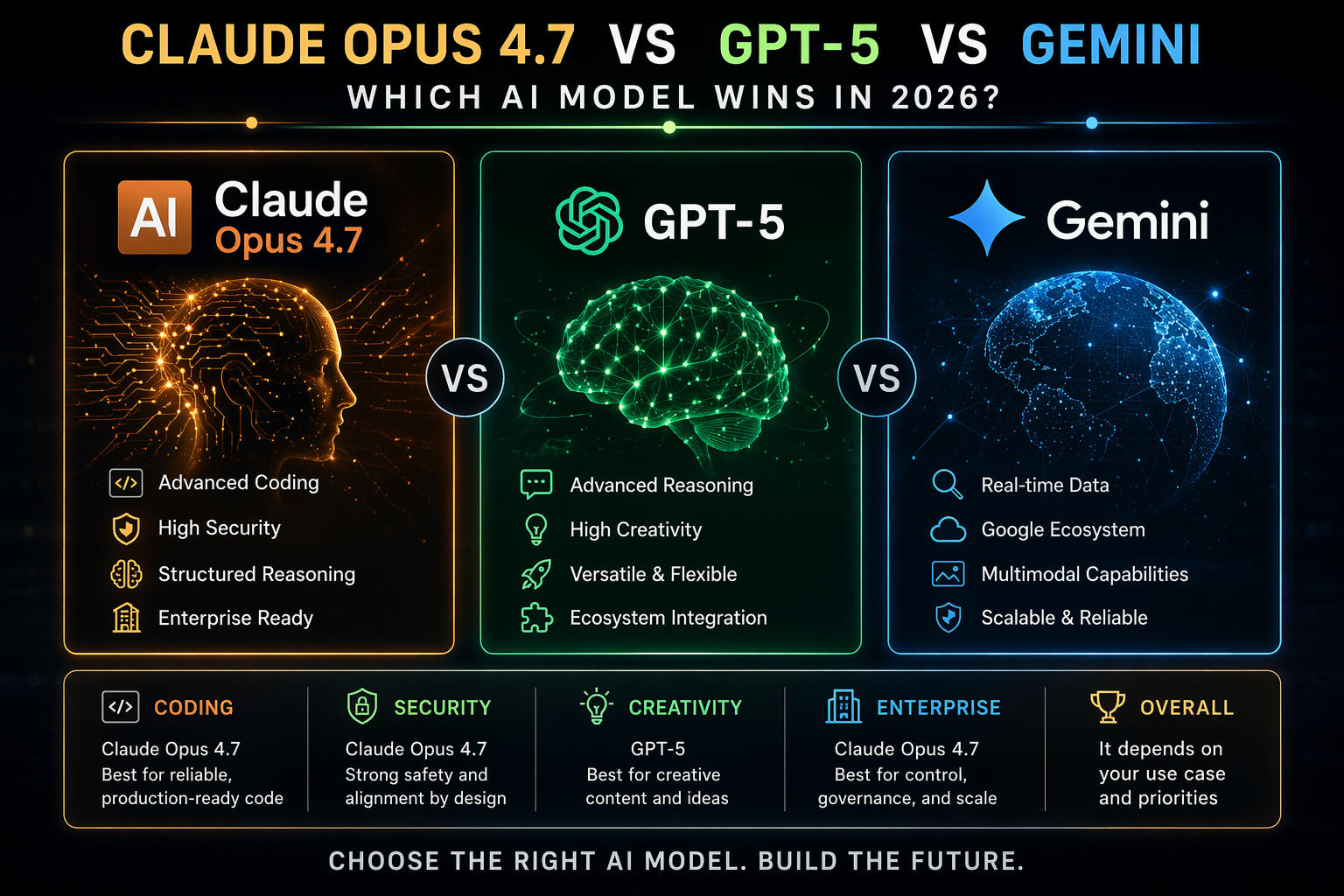
When people search for “Claude Opus 4.7 vs ChatGPT” or “Opus 4.7 vs GPT-5.4 benchmark,” they usually want a simple winner. But for writers, creators, marketers, developers, and founders, the better question is: which environment makes the work easier to finish?
GPT-5.4 Canvas is ChatGPT’s focused workspace for drafting, rewriting, organizing, coding, and collaborating on longer pieces. It feels like a smart document editor where you can highlight sections, ask for changes, compare versions, and keep momentum.
Claude 4.7 Artifacts is Claude’s workspace for creating standalone outputs — documents, code previews, dashboards, visual prototypes, tables, and structured deliverables. It shines when you want the model to build something you can inspect beside the conversation.
Both are excellent. But they are excellent in different ways.

The Fast Comparison Table
| Category | GPT-5.4 Canvas | Claude Opus 4.7 Artifacts | Best Pick |
|---|---|---|---|
| General writing | Fast, flexible, strong at tone changes and iterative editing | More deliberate, polished, and often more nuanced | GPT-5.4 Canvas for speed |
| Long-form content | Great for outlines, revisions, and multi-step drafting | Excellent at structure, coherence, and sustained reasoning | Claude 4.7 Artifacts |
| Coding | Strong, especially with agentic debugging and app workflows | Reported coding benchmark leadership around 87.6% in some evals | Claude 4.7 Artifacts |
| Agentic tasks | Better for tool use, workflow execution, and multi-step automation | Very capable, especially for multi-tool orchestration | GPT-5.4 Canvas |
| Visual/interactive outputs | Useful, but more editor-first | Artifacts are excellent for previews and working deliverables | Claude 4.7 Artifacts |
| Best for teams | Marketing, operations, product, and mixed workflows | Engineering, research, product specs, and technical writing | Depends on team type |
1. Best Overall Writing Environment: GPT-5.4 Canvas
If your day includes blog posts, emails, landing pages, scripts, outlines, rewrites, briefs, and client work, GPT-5.4 Canvas is the easier default recommendation [AMAZON_LINK].
The main advantage is flow. You can start with a rough idea, turn it into an outline, expand it into a draft, highlight a weak section, rewrite the intro, shorten the ending, and ask for a stronger headline without constantly losing context.
Canvas is especially good when you need to:
- Create several versions of the same message
- Rewrite in different tones or reading levels
- Turn research notes into structured drafts
- Improve hooks, headlines, CTAs, and transitions
- Move quickly from idea to publishable copy
For most writers and marketers, the winner is not the model that scores highest on a coding benchmark. It is the one that helps you get from blank page to final draft with the least friction. That is where Canvas feels strongest.

2. Best for Polished Long-Form Work: Claude Opus 4.7 Artifacts
Claude Opus 4.7 Artifacts is the better choice when you care about depth, structure, and careful reasoning [AMAZON_LINK]. If GPT-5.4 Canvas feels like a fast creative partner, Claude Artifacts feels like a patient senior editor who also knows how to build a working prototype.
For long-form articles, white papers, reports, product documentation, and strategy memos, Claude often produces a more naturally organized first draft. It tends to keep track of subtle instructions well, especially when the assignment has constraints.
Artifacts also make the output feel tangible. Instead of burying everything in a chat thread, Claude can place a document, code file, table, or prototype in a separate workspace. That is extremely useful when reviewing:
- Technical documentation
- Research summaries
- Product requirement documents
- Interactive content mockups
- Code-based examples and demos
3. Coding: Claude 4.7 Has the Edge, But It Depends on the Job
For “Opus 4.7 vs GPT-5.4 coding,” the short answer is: Claude Opus 4.7 usually has the edge for complex coding reasoning. Recent comparisons often cite Opus leading coding-focused evaluations, with figures around 87.6% in some benchmark discussions.
That said, GPT-5.4 is not weak. In fact, for practical app-building workflows, bug fixing, and multi-step tool use, GPT-5.4 can feel faster and more action-oriented. If your coding work involves asking the model to plan, edit, test, explain, and keep moving across a project, GPT-5.4 Canvas remains highly competitive.
Use Claude 4.7 Artifacts for coding when:
- You want clean, well-reasoned code explanations
- You are building demos, previews, or interactive examples
- You need careful refactoring
- You are working through complex logic or architecture
Use GPT-5.4 Canvas for coding when:
- You want faster iteration
- You are combining code with docs, copy, and planning
- You need agent-style execution
- You prefer a flexible editor-style workspace
4. Agentic Performance: GPT-5.4 Feels More Practical for Everyday Workflows
Benchmarks are helpful, but real workflows are messier. You might ask your tool to research competitors, draft a comparison page, create a launch checklist, write email copy, produce a social calendar, and turn everything into a clean internal brief.
That is where GPT-5.4 Canvas often feels more natural. It is strong at multi-step execution, fast revisions, and practical task completion. In broader model discussions, newer GPT-5.5 comparisons often show stronger agentic performance, but GPT-5.4 already performs very well for everyday business workflows.
Claude 4.7 is also excellent at orchestration, especially when the work requires careful reasoning across tools or inputs. But if you want a general assistant that helps you move through a messy to-do list, GPT-5.4 Canvas is usually the safer pick.
5. Vision-Heavy and Interactive Workflows: Claude Artifacts Wins
If your work includes screenshots, diagrams, UI reviews, data visuals, prototypes, or interactive outputs, Claude Artifacts has a real advantage. The Artifact workspace makes it easier to inspect what was created, refine it, and treat it like a deliverable instead of a message.
This is why product teams, developers, educators, and technical creators often prefer Claude for visual and interactive work. You can ask for a prototype, review the result, request changes, and keep the working object separate from the conversation.

6. Pricing: Don’t Pick Only by Subscription Cost
Pricing changes often, and both platforms continue to adjust limits, plans, and team features. The smarter move is to evaluate cost by finished output per hour, not just monthly subscription price.
Ask yourself:
- Which tool gets me to a final draft faster?
- Which one requires fewer rewrites?
- Which one handles my longest documents better?
- Which one reduces manual formatting or debugging?
- Which one fits my team’s review process?
If GPT-5.4 saves you three hours a week on marketing work, it is probably worth it. If Claude 4.7 prevents one major coding mistake or produces better technical docs, it may pay for itself immediately.
7. Best Alternatives: Gemini, GPT-5.5, and Reddit’s Favorite Debates
People also ask about Claude Opus 4.7 vs Gemini. Gemini remains a strong option, especially if your workflow is deeply tied to Google’s ecosystem. For research, files, spreadsheets, and productivity integration, it can be very convenient. But for pure writing environment quality, Canvas and Artifacts still feel more focused.
As for “GPT-5.5 vs Opus 4.7 Reddit” and “GPT-5.4 vs Opus 4.7 Reddit,” the pattern is predictable: developers often praise Claude’s coding quality, while marketers, operators, and general users often prefer ChatGPT’s speed and flexibility. Both sides are right because they are solving different problems.
How to Choose in 60 Seconds
- If you write daily marketing content: choose GPT-5.4 Canvas [AMAZON_LINK].
- If you create technical docs or code-heavy content: choose Claude Opus 4.7 Artifacts [AMAZON_LINK].
- If you need visual prototypes or interactive files: choose Claude.
- If you need a flexible all-purpose work assistant: choose GPT-5.4.
- If your team is mixed: use both, with GPT-5.4 for drafting and Claude for technical review.
FAQ
Is Claude Opus 4.7 better than ChatGPT?
Claude Opus 4.7 is often better for coding, long-form reasoning, technical writing, and Artifact-based outputs. ChatGPT with GPT-5.4 Canvas is usually better for fast drafting, everyday writing, brainstorming, and agent-style workflows.
Which is better for benchmarks: Opus 4.7 or GPT-5.4?
Opus 4.7 tends to lead in several coding and reasoning-heavy comparisons, including reported coding scores around 87.6%. GPT-5.4 remains extremely competitive overall and often feels stronger in practical workflow execution.
Is GPT-5.4 Canvas good for coding?
Yes. GPT-5.4 Canvas is strong for coding, especially when the task includes planning, debugging, documentation, and iterative improvement. Claude 4.7 may be better for complex code reasoning, but GPT-5.4 is excellent for practical development workflows.
Should I use Claude Artifacts for writing?
Yes, especially for long-form documents, structured reports, technical guides, and content that benefits from a separate preview area. Artifacts make it easier to review and refine polished outputs.
What about Claude Opus 4.7 vs Gemini?
Gemini is a good option for users heavily invested in Google tools. But if your main priority is a premium writing and creation environment, GPT-5.4 Canvas and Claude 4.7 Artifacts are usually stronger choices.
Final Recommendation
If you want one tool for most writing, editing, planning, and day-to-day business work, pick GPT-5.4 Canvas [AMAZON_LINK]. It is faster, more flexible, and easier to use across mixed workflows.
If your work is technical, code-heavy, visual, or deeply structured, pick Claude Opus 4.7 Artifacts [AMAZON_LINK]. It is the stronger choice for careful reasoning, coding quality, and interactive deliverables.
The best setup for serious work in 2026 is simple: use GPT-5.4 Canvas to move fast, and Claude 4.7 Artifacts to refine, validate, and build the parts that need extra precision.