
By Rahul Mehta

Most people compare Gemini vs ChatGPT the wrong way: they ask “Which one is smarter?” when the better question is, “Which one is better for the task I actually do every day?” The hype around Gemini is real, but so is the reason many writers, coders, students, and teams still default to ChatGPT.
If you want a simple, practical answer without a 40-minute YouTube review, this guide breaks it down by cost, writing, coding, research, medical school use, Reddit-style opinions, and whether Claude should be in the conversation too.
| Category | Winner | Why it matters |
|---|---|---|
| Writing and editing | ChatGPT | More natural long-form writing, better tone control, stronger outlining |
| Google ecosystem | Gemini | Works well with Gmail, Docs, Drive, Sheets, and Android workflows |
| Coding help | ChatGPT | Usually stronger at step-by-step debugging and explaining code |
| Multimodal tasks | Gemini | Strong with images, documents, screenshots, and mixed inputs |
| Best all-rounder | ChatGPT | More consistent for everyday knowledge work |
Gemini vs ChatGPT: What Is the Actual Difference?
At a high level, both tools can write, brainstorm, summarize, analyze, explain, translate, code, and answer questions. The difference is not that one is “real” and the other is “fake.” The difference is where each one feels strongest in normal use.
ChatGPT feels more like a flexible work assistant. It is especially good when you need structure: outlines, arguments, rewritten paragraphs, code explanations, workflows, formulas, business plans, emails, and back-and-forth refinement.
Gemini feels more like a Google-native research and multimodal assistant. It shines when you are using Google apps, working with files, asking about images, summarizing information, or moving between search-style tasks and productivity tasks.
If you care about broader tool comparisons, you may also like this guide to best AI tools for productivity.

Gemini vs ChatGPT Cost: Which Is Cheaper?
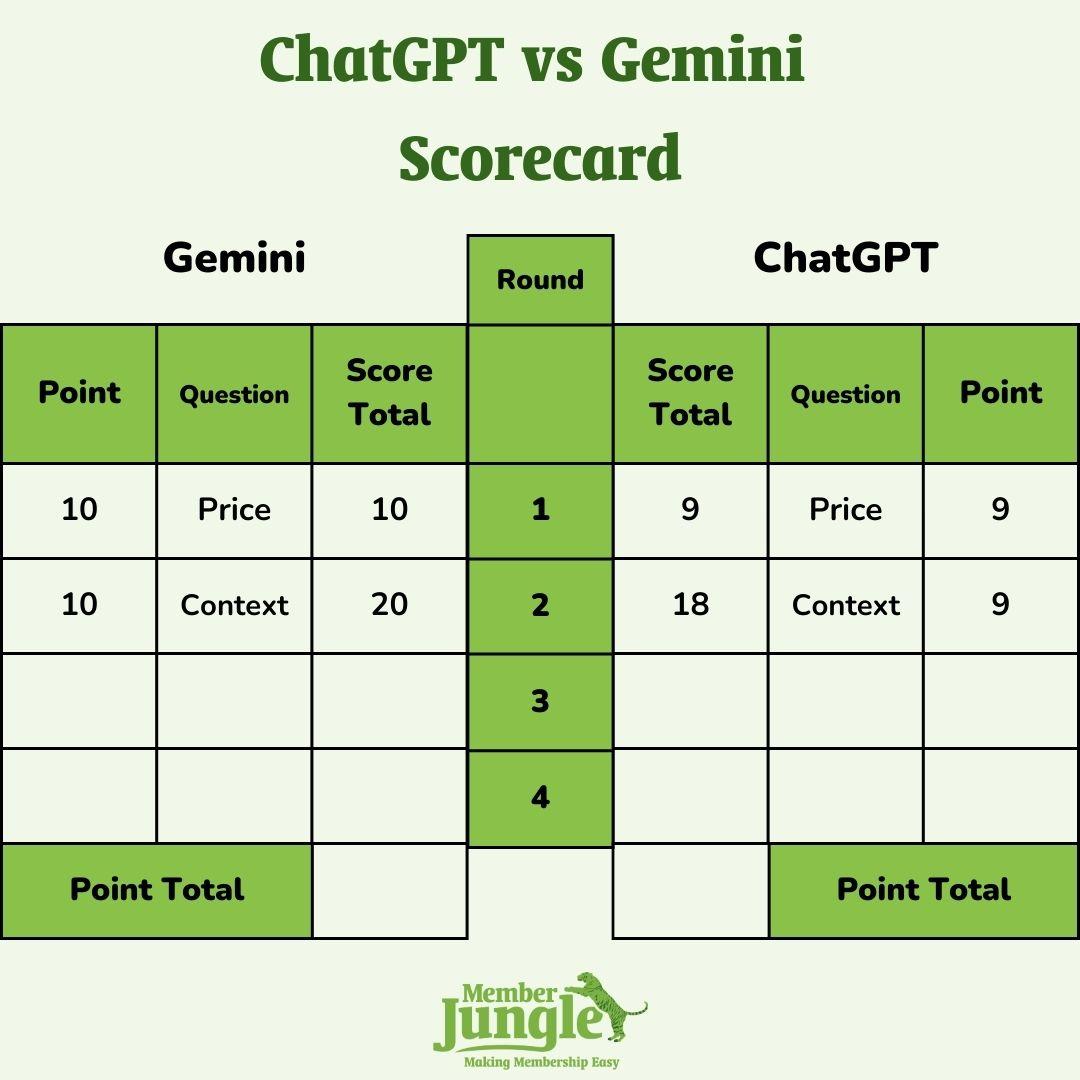
Both platforms usually offer a free tier and a paid tier. Pricing changes often, but the most common paid plans sit around the same general range, usually near the monthly cost of a streaming subscription bundle.
| Plan Type | ChatGPT | Gemini |
|---|---|---|
| Free plan | Available with usage limits | Available with usage limits |
| Paid individual plan | Often around $20/month for Plus-style access (check current price on Amazon) | Often around $20/month through Google AI Pro/Advanced-style access (check current price on Amazon) |
| Team/business plans | Available, pricing varies | Available, often tied to Google Workspace |
| Best value if you use Google apps | Good, but less native | Better |
| Best value for writing/coding | Better | Good, but less consistent |
Cost verdict: If price is your only factor, neither wins by a mile. Pick based on workflow. If you already pay for Google services and live in Docs, Gmail, and Drive, Gemini may feel like better value. If you need one paid assistant for writing, coding, and thinking through problems, ChatGPT is usually the safer buy.
Gemini vs ChatGPT for Writing and Reasoning
This is where ChatGPT still has a clear edge for many users. It is better at taking a messy idea and turning it into something structured, readable, and useful.
ChatGPT is better for:
- Blog posts, essays, scripts, and emails
- Rewriting text in a specific tone
- Building outlines and frameworks
- Explaining complex ideas step by step
- Creating repeatable workflows and templates
Gemini is better for:
- Summarizing Google Docs or Drive files
- Working across Google Workspace
- Quick research-style answers
- Understanding screenshots, images, and mixed media prompts
If your work is mostly text-heavy, ChatGPT wins. If your work is mixed between text, files, images, search, and Google apps, Gemini becomes much more competitive.
Gemini vs ChatGPT for Coding
For coding, ChatGPT is usually the better first choice, especially for beginners and intermediate developers. It tends to be stronger at explaining why code fails, walking through errors, and helping you think through architecture.
Use ChatGPT when you need help with:
- Debugging JavaScript, Python, SQL, HTML, CSS, or backend code
- Understanding error messages
- Writing functions from scratch
- Refactoring messy code
- Creating documentation and test cases
Gemini can absolutely help with coding too, especially if you are working in Google’s development ecosystem or need to analyze screenshots, logs, or docs. But if someone asks “Gemini vs ChatGPT for coding, which should I pay for?” my answer is simple: start with ChatGPT.
Gemini vs ChatGPT for Medical Students
Medical students should treat both tools as study assistants, not authorities. Neither should replace textbooks, lectures, clinical guidelines, or professional judgment.
ChatGPT is better for active learning:
- Turning dense notes into flashcards
- Creating practice questions
- Explaining physiology in plain English
- Building study schedules
- Comparing diseases in tables
Gemini is better for document-heavy review:
- Summarizing PDFs or lecture materials
- Working with Google Docs study notes
- Reviewing images or diagrams when supported
- Connecting study workflows inside Google tools
For med students, I would choose ChatGPT for learning and explanation, and Gemini if your entire study system is built in Google Drive. For more student-focused tool choices, see our guide to AI tools for students and researchers.
Gemini vs ChatGPT vs Claude: Should Claude Be Considered?
Yes. Claude deserves a spot in this conversation, especially if you care about long documents, careful writing, and a more cautious tone.
| Tool | Best For | Weak Spot |
|---|---|---|
| ChatGPT | Writing, coding, reasoning, automation, general productivity | Can still make confident mistakes |
| Gemini | Google apps, multimodal tasks, research-style workflows | Writing and reasoning can feel less polished |
| Claude | Long documents, careful editing, thoughtful analysis | May be less tool-integrated depending on your workflow |
If you are a writer or analyst, Claude can be excellent. If you want one tool for the broadest range of tasks, ChatGPT is still the easiest recommendation. If you are deep in Google Workspace, Gemini makes the most sense.
What Reddit Usually Gets Right and Wrong
Reddit threads about Gemini vs ChatGPT are useful, but they can also be chaotic. One person tests a single prompt and declares a winner. Another person uses a tool for six months and gives a totally different answer.
What Reddit often gets right:
- ChatGPT feels more reliable for writing and coding.
- Gemini is improving quickly and can be great with Google tools.
- Both tools hallucinate, so important facts need checking.
What Reddit often gets wrong:
- One bad answer does not prove the whole tool is bad.
- Benchmarks do not always match real-world use.
- The “best” tool depends heavily on your workflow.

So, Which Is Better?
If you want the most practical answer, use this decision rule:
- Pick ChatGPT if you write, code, plan, brainstorm, automate, or need strong step-by-step reasoning.
- Pick Gemini if you use Google Workspace every day and want help across Gmail, Docs, Drive, Sheets, Android, images, and documents.
- Consider Claude if you work with long documents, careful edits, or nuanced analysis.
For most people asking “Gemini vs ChatGPT which is better?” the answer is: ChatGPT is the better all-purpose choice, while Gemini is the better Google-native choice. If your phone, files, email, calendar, and documents are all tied to Google, Gemini may feel more convenient. If your priority is quality output across many tasks, ChatGPT is harder to beat.
You may also find this helpful if you compare productivity tech across categories: best smartphones for productivity.
FAQ
Is Gemini better than ChatGPT?
Gemini is better for some users, especially people who rely heavily on Google apps and multimodal tasks. But for writing, coding, reasoning, and general productivity, ChatGPT is usually better overall.
Is ChatGPT or Gemini cheaper?
They are usually similar in cost at the paid individual level, with both commonly offering free access and premium plans. The better value depends on what you use: ChatGPT for broad productivity, Gemini for Google ecosystem integration.
Which is better for coding, Gemini or ChatGPT?
ChatGPT is usually better for coding because it tends to explain errors more clearly, reason through bugs step by step, and help with refactoring, documentation, and learning new programming concepts.
Which is better for students?
For most students, ChatGPT is better for explanations, essays, flashcards, and study planning. Gemini is better if your classes and notes are stored in Google Docs, Drive, and Gmail.
Should I use ChatGPT, Gemini, or Claude?
Use ChatGPT for the best all-around experience, Gemini for Google-connected work, and Claude for long-form document analysis or careful writing. If you only want one, choose ChatGPT unless your workflow is deeply tied to Google.
“Use ChatGPT for the best all-around experience, Gemini for Google-connected work, and Claude for long-form document analysis or careful writing.”
Final Verdict: Pick ChatGPT Unless Google Integration Is Your Main Priority
ChatGPT is the better default choice for most people because it performs more consistently across writing, coding, reasoning, planning, and everyday work. Gemini is not just hype, though; it makes real sense for users who want tight Google integration and strong multimodal support.
My direct recommendation: start with the free versions of both, test your five most common tasks, then pay for the one that wins your actual workflow. If you need to choose today, choose ChatGPT Plus (check current price on Amazon) for general use or Google AI Pro/Gemini Advanced (check current price on Amazon) if your work lives inside Google Workspace.