-1778644440734.webp)
The Korean baseball edit trend is blowing up because it turns an ordinary selfie into a glossy, stadium-ready sports poster in minutes. The catch? Most people get flat, plastic-looking results because their prompt is too vague or their photo is poorly chosen.
If you want the hyper-realistic K-drama-meets-pro-baseball look, you need three things: a clean selfie, the right visual direction, and a detailed ChatGPT photo editing prompt that tells the tool exactly how to style the uniform, lighting, stadium, camera angle, and broadcast details.
| Element | Best Choice | Why It Matters |
|---|---|---|
| Photo Type | Clear selfie from chest up | Keeps your face accurate and avoids distorted edits |
| Prompt Style | Detailed cinematic sports prompt | Creates the Korean baseball poster look instead of a generic jersey edit |
| Optional Animation | Kling AI or similar video tool | Adds camera movement, crowd energy, and viral short-form appeal |
What Is the Korean AI Baseball Trend?
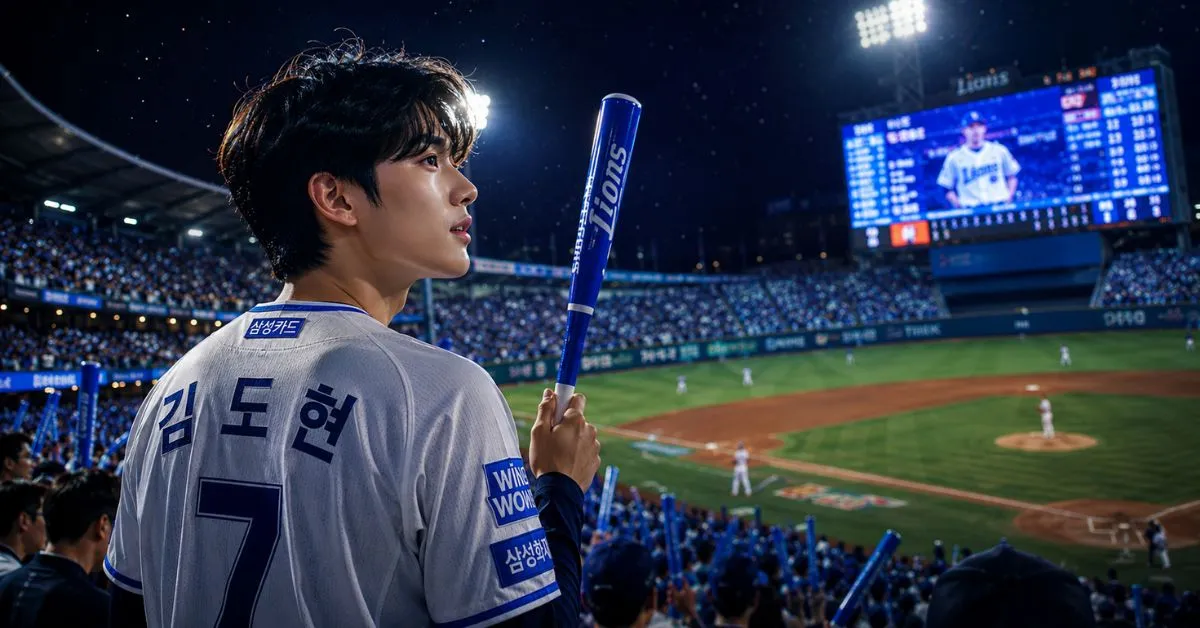
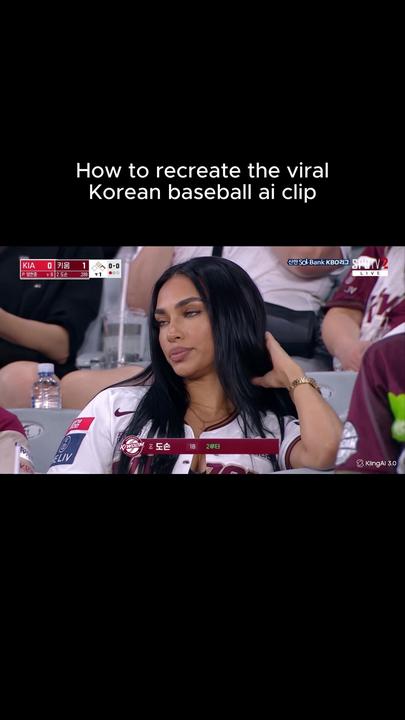
The Korean AI baseball trend is a viral photo-editing style where people upload selfies and turn themselves into professional Korean baseball players. The final image usually looks like a high-end sports campaign, stadium poster, or broadcast promo shot.
Common features include:
- Clean Korean baseball uniform styling
- Night stadium background with dramatic floodlights
- Realistic skin texture and facial details
- Baseball glove, bat, cap, or dugout pose
- Korean broadcast graphics or team-poster atmosphere
- Soft cinematic blur with sharp face focus
The reason it works so well is simple: baseball visuals already have built-in drama. Add stadium lights, a confident pose, and a polished uniform, and even a basic selfie can feel like a professional sports portrait.
Step 1: Take the Right Selfie Before You Use the Prompt
Your prompt can only do so much if the source photo is blurry, dark, or awkwardly cropped. For the cleanest result, start with 2 to 4 photos from different angles: front-facing, slight side profile, upper-body, and one natural expression.
Best selfie setup
- Use natural window light or a soft ring light (check current price on Amazon)
- Keep your face fully visible with no sunglasses or heavy filters
- Use a plain background so the tool can separate you clearly
- Take the photo from chest height, not too high or too low
- Wear a simple T-shirt or hoodie if you want the uniform to replace it cleanly
If you create a lot of edits for social media, a small phone tripod (check current price on Amazon) helps you capture cleaner angles without weird arm distortion. For more creative workflows, you may also like this guide to AI tools for creators.
Step 2: Upload Your Photo to ChatGPT
Open ChatGPT, start a new chat, and upload your best selfie. If you have multiple photos, upload a few and tell it which one should be used as the main reference. The key instruction is to preserve your real face while changing the outfit, setting, and visual style.
Before running the final edit, you can say:
“Use this photo as the face reference. Keep my facial identity, expression, skin texture, and natural features accurate. Only change the clothing, background, pose styling, and cinematic sports atmosphere.”
This one line prevents the most common problem: the edit looking like a totally different person.
7 Best ChatGPT Photo Editing Prompts for the Korean AI Baseball Trend
1. The Classic Korean Baseball Poster Prompt
Prompt: Transform this photo into a hyper-realistic Korean professional baseball player portrait. Keep my face, identity, expression, and natural skin texture accurate. Dress me in a clean modern Korean baseball uniform with subtle navy and white details, standing inside a packed night stadium under bright floodlights. Add a cinematic sports poster look, shallow depth of field, realistic fabric texture, soft sweat highlights, confident pose, and professional broadcast color grading. Make it look like an official team promo photo, ultra-realistic, sharp focus on face, 4K detail.
2. The Viral Dugout Shot Prompt
Prompt: Edit this image into a realistic Korean baseball dugout scene. Keep my facial features unchanged. Place me wearing a professional baseball jersey and cap, leaning slightly forward in the dugout with a focused game-day expression. Add blurred teammates in the background, stadium lights, subtle shadows, realistic jersey stitching, and cinematic Korean sports drama styling. Make the image feel natural, emotional, and high-end, like a still from a baseball broadcast.
3. The Batter Walk-Up Prompt
Prompt: Turn this photo into a dramatic Korean baseball batter walk-up portrait. Preserve my face exactly. Add a baseball bat resting on my shoulder, a fitted team uniform, batting gloves, and a night stadium filled with blurred fans. Use strong rim lighting from stadium floodlights, cinematic contrast, realistic fabric folds, and a confident professional athlete mood. The result should look like a premium sports magazine cover.
4. The Pitcher Ace Prompt
Prompt: Create a hyper-realistic Korean baseball pitcher portrait using my uploaded photo as the face reference. Keep my identity accurate. Dress me in a crisp professional baseball uniform with a glove on one hand, standing on the pitcher’s mound under dramatic stadium lights. Add dust in the air, shallow background blur, intense game atmosphere, natural facial detail, realistic shadows, and broadcast-style color grading.
5. The K-Drama Sports Hero Prompt
Prompt: Transform this selfie into a cinematic Korean baseball drama hero poster. Keep my real face and natural expression. Put me in a stylish Korean baseball uniform with a clean cap, standing in a glowing stadium tunnel before entering the field. Add emotional lighting, soft lens flare, realistic skin texture, premium sports photography style, and a powerful but natural pose. Make it feel like a promotional poster for a Korean sports series.
6. The Trading Card Prompt
Prompt: Turn this photo into a realistic Korean baseball trading card design. Preserve my facial identity. Show me in a professional baseball uniform with a stadium background, clean action pose, glossy card lighting, player-name area, subtle Korean broadcast graphic elements, and premium collectible-card styling. Keep the design modern, sharp, and realistic, not cartoonish.
7. The Championship Celebration Prompt
Prompt: Edit this image into a Korean baseball championship celebration scene. Keep my face accurate and realistic. Dress me in a professional baseball uniform, standing under stadium confetti and bright lights, with blurred cheering fans and teammates behind me. Add a joyful but natural expression, realistic uniform texture, cinematic lighting, and premium sports campaign color grading.
Step 3: Add Stadium Image and Animation for a Viral Clip
If you want the trend to feel more like a TikTok, Reel, or Shorts video, create a still image first, then animate it. Tools like Kling AI (check current price on Amazon) can add subtle camera movement, jersey motion, crowd lights, and dramatic zooms. You can then finish the clip in CapCut (check current price on Amazon) with text overlays, broadcast graphics, and music.
Simple animation prompt for Kling AI
Prompt: Animate this Korean baseball player portrait with a slow cinematic camera push-in, subtle stadium light flicker, gentle jersey movement, blurred crowd motion in the background, and a professional sports broadcast atmosphere. Keep the face stable and realistic. No face distortion, no extra fingers, no warped uniform logos.
For better phone edits, check out our guide to best smartphones for content creators and this breakdown of sports tech trends.
Best Tools for the Korean Baseball AI Prompt Trend
| Tool | Best For | Free Option? |
|---|---|---|
| ChatGPT | Creating and refining Korean baseball photo prompts | Limited free access may be available |
| Kling AI (check current price on Amazon) | Animating your baseball portrait into a cinematic video | Often offers limited free credits |
| CapCut (check current price on Amazon) | Adding captions, music, zooms, and broadcast overlays | Yes, with optional paid features |
| Ring Light (check current price on Amazon) | Improving selfie quality before editing | No, but affordable |
Tips to Make Your Baseball Edit Look More Realistic
- Ask for “realistic skin texture” so your face does not look overly smooth.
- Use “shallow depth of field” to get that professional sports photography blur.
- Avoid real team logos unless you have permission or are making a private fan edit.
- Add lighting direction, such as “stadium floodlights from behind and above.”
- Request no distortion for hands, face, cap, glove, and uniform lettering.
My favorite formula is: face preservation + uniform details + stadium setting + camera style + lighting + realism controls. That combination gives you a much better chance of getting the viral Korean baseball look on the first or second try.
FAQ
What is the best Korean baseball AI trend prompt?
The best prompt is specific about preserving your face while changing the scene into a cinematic Korean baseball stadium portrait. Use details like professional uniform, night stadium lights, realistic jersey texture, shallow depth of field, and broadcast-style color grading.
Can I do the AI baseball trend for free?
Yes, you can usually test the trend with free or limited credits on tools like ChatGPT, Kling AI, and CapCut. Free plans may limit image quality, generation speed, or video length, so paid upgrades are only worth it if you plan to make several edits.
How do I use Kling AI for the Korean baseball trend?
First, create your baseball player image. Then upload it to Kling AI and use an animation prompt asking for a slow camera push-in, stadium light movement, subtle crowd motion, and stable facial details. Keep the animation simple for the most realistic result.
Why does my baseball edit not look like me?
This usually happens when the source photo is blurry or the prompt does not clearly say to preserve your facial identity. Upload a clear front-facing selfie and include: “Keep my face, identity, expression, and natural features accurate.”
Can I add Korean text or broadcast graphics?
Yes. Ask for “subtle Korean broadcast-style graphics” or add them later in an editor like CapCut. For cleaner results, create the portrait first, then add text overlays manually so the lettering does not come out distorted.
Final Verdict: The Best Prompt to Start With
If you only try one, use the Classic Korean Baseball Poster Prompt. It gives the most balanced result: realistic face, clean uniform, dramatic stadium lighting, and the polished Korean sports-promo style people are looking for.
“If you only try one, use the Classic Korean Baseball Poster Prompt.”
For the strongest viral version, create the still image in ChatGPT, animate it with Kling AI (check current price on Amazon), then polish the final video in CapCut (check current price on Amazon). Start with a sharp selfie, be specific in your prompt, and always tell the tool to preserve your real facial features.
Recommended Productivity Gear
*Affiliate link — we may earn a small commission at no extra cost to you.