

By Neha Joshi
Most people don’t need more apps — they need fewer bottlenecks. The best AI productivity tools in 2026 are not just “nice to have”; they can write drafts, summarize meetings, automate admin work, help you code, build apps, and turn messy ideas into usable output in minutes.
The catch? There are too many tools, and many overlap. This guide cuts through the noise and shows you which tools are actually worth using based on your workflow.
| Best For | Top Pick | Why It Stands Out |
|---|---|---|
| Everyday productivity | ChatGPT | Versatile for writing, planning, analysis, and brainstorming |
| Writing and deep research | Claude | Excellent long-form reasoning and document handling |
| Automation | Zapier | Connects apps and automates repetitive workflows |
| Coding | Cursor | Developer-focused editor with smart code assistance |
How to Choose the Best AI Productivity Tool in 2026
Before you sign up for five subscriptions, start with your biggest time drain. Are you losing hours to email? Meetings? Writing? Coding? Research? The best tool is the one that removes friction from work you already do.

Here’s a simple way to choose:
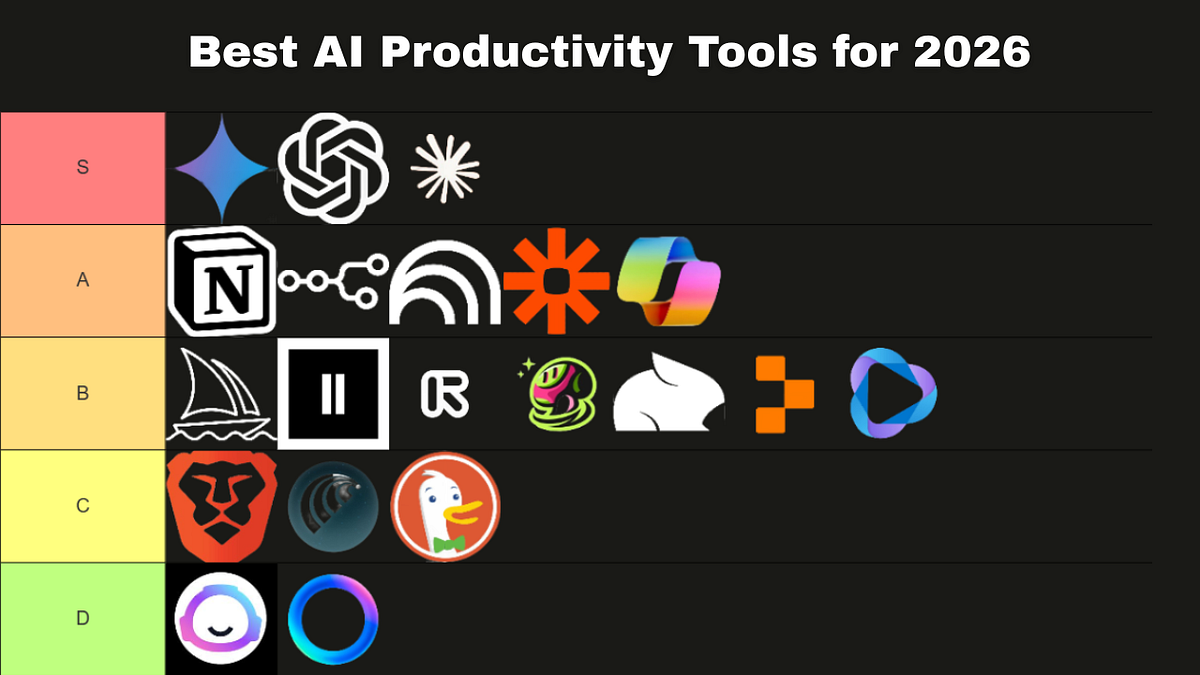
- If you need one all-purpose assistant: choose ChatGPT or Claude.
- If you live in meetings: choose Otter.ai, Fireflies.ai, or Supernormal.
- If you write, research, or edit documents: choose Claude, Grammarly, or Notion AI.
- If you build software: choose Cursor or GitHub Copilot.
- If you want apps to talk to each other: choose Zapier.
You can also explore more guides in our AI tools hub if you want category-specific breakdowns.
11 Best AI Productivity Tools for 2026
1. ChatGPT — Best Overall Productivity Assistant (check current price on Amazon)
Best for: writing, planning, brainstorming, research, data analysis, and daily admin.
ChatGPT is still the easiest recommendation for most people because it handles so many jobs well. You can use it to draft emails, build content calendars, summarize PDFs, analyze spreadsheets, create study plans, outline presentations, and brainstorm business ideas.
It is especially useful if you want one flexible assistant instead of a different app for every task. The paid version is usually worth it for professionals, but the free version is strong enough for students, creators, and casual users.
2. Claude — Best for Writing, Research, and Long Documents (check current price on Amazon)
Best for: long-form writing, document review, policy analysis, research notes, and thoughtful editing.
Claude is excellent when you need clear, polished language or want to work through long documents. It feels particularly strong for writers, consultants, researchers, students, and anyone who needs help turning messy notes into structured output.
If your work involves reading, comparing, or rewriting large documents, Claude should be near the top of your list.
3. Zapier — Best for Automation and App Workflows (check current price on Amazon)
Best for: automating repetitive tasks across Gmail, Slack, Notion, Google Sheets, HubSpot, Trello, and thousands of other apps.
Zapier is the tool to use when you catch yourself doing the same manual task over and over. For example, you can automatically save email attachments to Google Drive, create tasks from form submissions, send Slack alerts from new leads, or update a spreadsheet when a payment comes in.
For small businesses, solo operators, and operations teams, Zapier can save hours every week.
4. Cursor — Best AI Productivity Tool for Coding (check current price on Amazon)
Best for: developers, technical founders, students learning to code, and teams shipping faster.
Cursor is a code editor built for faster development. It can explain code, refactor files, generate functions, debug errors, and help you understand unfamiliar codebases. If you use GitHub often, Cursor can feel like a major upgrade to your daily workflow.
For people searching for “best AI productivity tools 2026 GitHub,” Cursor and GitHub Copilot are the two obvious places to start.
5. GitHub Copilot — Best for Developers Already in GitHub (check current price on Amazon)
Best for: code suggestions, autocomplete, test generation, and developer productivity inside popular IDEs.
GitHub Copilot remains one of the most practical tools for programmers because it fits directly into existing coding workflows. It is great for repetitive code, boilerplate, tests, and quick suggestions while you build.
Choose Copilot if you already work heavily in GitHub and want something that feels native rather than separate.
6. Notion AI — Best for Workspace Productivity (check current price on Amazon)
Best for: notes, project planning, team wikis, meeting notes, knowledge bases, and content calendars.
Notion AI is ideal if your work already lives in Notion. It helps summarize pages, improve writing, generate action items, organize notes, and turn rough ideas into structured plans.
It is not the most powerful standalone assistant, but as part of a workspace, it is incredibly convenient.
7. Otter.ai — Best for Meeting Transcription (check current price on Amazon)
Best for: Zoom calls, interviews, sales calls, lectures, and team meetings.
Otter.ai records and transcribes conversations so you can stop frantically taking notes. It can identify speakers, produce summaries, and help you search past conversations.
Students, managers, podcasters, sales teams, and consultants will get the most value from it. If your calendar is packed, this is one of the fastest wins.
8. Superhuman Mail — Best for Email Productivity (check current price on Amazon)
Best for: inbox-heavy professionals, founders, executives, recruiters, and sales teams.
Superhuman Mail is designed to make email faster. It helps you triage messages, write replies, schedule follow-ups, and move through your inbox with keyboard shortcuts.
It is not cheap, so casual users can skip it. But if email is where your day disappears, Superhuman can pay for itself quickly.
9. Grammarly — Best for Polished Writing (check current price on Amazon)
Best for: emails, essays, proposals, blog posts, reports, and professional communication.
Grammarly is still one of the easiest tools to recommend because it works everywhere: browser, email, documents, and desktop apps. It catches grammar issues, improves tone, and helps make writing clearer.
Students and professionals should keep this one installed even if they also use ChatGPT or Claude.
10. Napkin.ai — Best for Visual Thinking (check current price on Amazon)
Best for: turning text into diagrams, visual notes, presentation graphics, and idea maps.
Napkin.ai is useful when your idea is clear in your head but hard to explain visually. Paste text, and it helps create diagrams, flowcharts, and visuals you can use in presentations or planning sessions.
This is a great pick for consultants, marketers, founders, educators, and anyone who explains complex ideas often.
11. Perplexity — Best for Fast Research (check current price on Amazon)
Best for: quick answers, source-backed research, market scans, product comparisons, and learning.
Perplexity is strong when you want fast research with citations. It is especially handy for comparing products, understanding trends, or getting a high-level view before diving deeper.
If you care about finance workflows, research stacks, and smarter decision-making, you may also like our guide to productivity tools for finance.
Best AI Productivity Tools Compared
| Tool | Best Use Case | Best For |
|---|---|---|
| ChatGPT | General productivity | Almost everyone |
| Claude | Writing and long documents | Writers, researchers, students |
| Zapier | Workflow automation | Teams and small businesses |
| Cursor | Coding | Developers |
| Otter.ai | Meeting notes | Managers, students, sales teams |
| Napkin.ai | Visual diagrams | Consultants and presenters |

Best Free AI Productivity Tools in 2026
If you want free AI tools for productivity, start with these:
- ChatGPT free plan: best general-purpose option.
- Claude free plan: great for writing and document-based work.
- Grammarly free: essential writing checks.
- Perplexity free: fast research with sources.
- Notion AI trial or limited access: useful if you already use Notion.
Free plans are enough for light use. Upgrade when you hit message limits, need better models, want team features, or rely on the tool daily.
Best AI Productivity Tools for Android
For Android users, the best picks are ChatGPT, Claude, Perplexity, Grammarly Keyboard, Notion, and Otter.ai. They work well on phones and tablets, especially for quick voice notes, research, writing help, and meeting summaries.
If you are optimizing your mobile setup, check our guide to best productivity smartphones too.
FAQ
What is the best AI productivity tool in 2026?
ChatGPT is the best overall choice because it handles the widest range of tasks: writing, planning, research, analysis, brainstorming, and daily admin. Claude is the best alternative if your work is more writing-heavy.
What are the best free AI productivity tools?
The best free options are ChatGPT, Claude, Grammarly, Perplexity, and Notion’s free workspace features. Start with those before paying for specialized tools.
What are the best AI tools for students?
Students should try ChatGPT for study plans, Claude for essays and reading notes, Grammarly for proofreading, Perplexity for research, and Otter.ai for lecture transcription.
What is the best AI productivity tool for coding?
Cursor is the best coding-focused pick for many developers in 2026. GitHub Copilot is also excellent, especially if you already use GitHub and want code suggestions inside your existing editor.
How many AI productivity tools do I actually need?
Most people only need two or three: one general assistant, one workflow-specific tool, and one automation or meeting tool. More than that often creates app overload.
Final Verdict: The Best AI Productivity Stack for 2026
If you want the simplest winning setup, choose ChatGPT (check current price on Amazon) for everyday work, Claude (check current price on Amazon) for writing and research, and Zapier (check current price on Amazon) for automation. Developers should add Cursor (check current price on Amazon) or GitHub Copilot (check current price on Amazon), while meeting-heavy professionals should add Otter.ai (check current price on Amazon).
“If you want the simplest winning setup, choose ChatGPT (check current price on Amazon) for everyday work, Claude (check current price on Amazon) for writing and research, and Zapier (check current price on Amazon) for automation.”
Don’t chase every new tool. Pick the one that removes your biggest daily bottleneck, use it consistently for two weeks, then decide whether it deserves a permanent spot in your workflow.
Recommended Productivity Gear
*Affiliate link — we may earn a small commission at no extra cost to you.